

Last Updated 28/08/2026
Executive Summary
- Strategic Overview: Comprehensive guidance on automating enterprise processes: sap btp and intelligent automation for gcc businesses tailored for Middle East and GCC enterprises.
- Key Advantage: Eliminates departmental silos, standardizes reporting, and accelerates operational agility.
- Next Step: Consult with certified WMS Middle East SAP experts for tailored architecture sizing and cost estimation.
The Paradox of Digital Enterprise
It’s 9 AM Monday in Dubai.
Fatima, an operations manager at a GCC manufacturing company, starts her week:- 9:00 AM: Checking 47 emails waiting for approvals
- 9:15 AM: Manually keying supplier invoices from PDFs into SAP (23 invoices this morning, 15 minutes each)
- 10:30 AM: Chasing 6 managers whose purchase order approvals are stuck in their email inboxes
- 11:00 AM: Manually reconciling a shipment discrepancy between SAP and the logistics system
- 11:45 AM: Creating an Excel report for her boss (pulling data from 3 different systems, copying and pasting)
By noon, she’s exhausted and hasn’t done any actual value-added work yet.
To evaluate technical partner qualifications and service levels, review our CFO checklist for choosing an SAP Gold Partner in Dubai.
This scenario plays out thousands of times daily across GCC enterprises. Companies have invested millions in enterprise systems SAP ERP, CRM, HRIS, specialized logistics platforms. Yet employees spend 40-60% of their time on manual, repetitive tasks that software should handle autonomously.
The paradox is stark: You have digital systems, but analog processes.
SAP can process 10,000 transactions per second. But the real bottleneck isn’t the system it’s humans clicking buttons, copying data, chasing emails, and filling forms. A single purchase order requires 7-10 human approval actions. A supplier invoice requires manual data entry from PDF. An employee onboarding requires 15-20 separate manual steps across HR, IT, and facilities systems.
The cost of this inefficiency is massive:
- Operational inefficiency: 30-50% of labor spent on non-value-added tasks[1]
- Growth constrained: Cannot scale without hiring proportionally (every 20% growth = hire 20% more back-office staff)
- Employee burnout: Back-office roles have high turnover (low morale from repetitive work)
- Compliance risk: Manual processes create audit gaps and error trails
- Competitive disadvantage: Competitors automating are moving faster, responding quicker, scaling without headcount growth
The opportunity: Intelligent automation combining robotic process automation (RPA), artificial intelligence, and integration platforms can automate 60-80% of repetitive enterprise processes. Not in the future. Today. And not just for tech giants. For mid-to-large GCC businesses.
Companies implementing intelligent automation are achieving 240% ROI within 6-9 months[2], with 30-50% cost reduction in affected processes[3]. More importantly, they’re freeing their best talent from repetitive work to focus on strategy, innovation, and customer value.
This article is written for operations leaders (COOs, VPs of Operations, Process Excellence Directors) who are tired of throwing headcount at process problems and want to scale operations without scaling proportionally in headcount. It explains what intelligent automation is, how it works, real GCC business cases, how to implement it, and how to avoid common pitfalls.

What is “Intelligent Automation”? (Beyond Simple RPA)
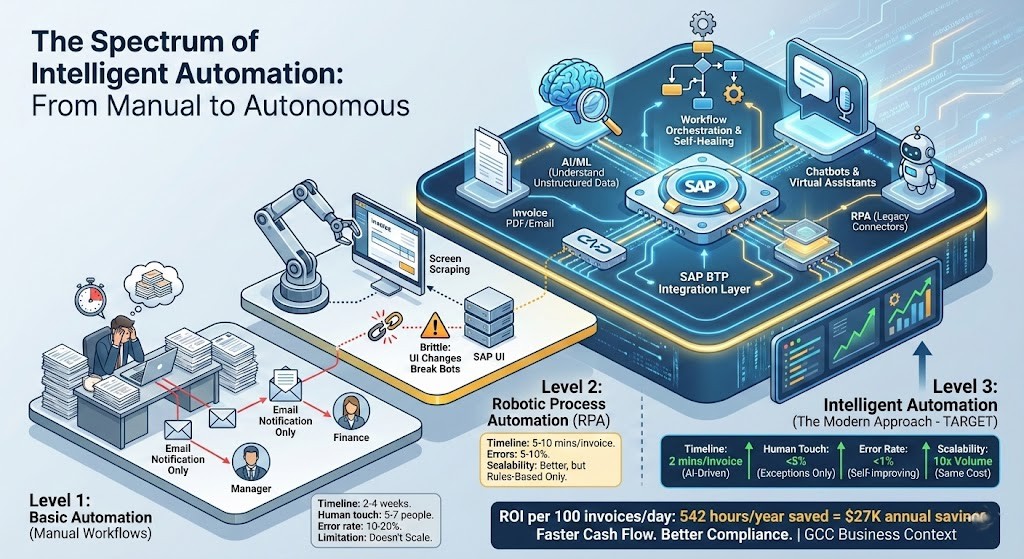
Most companies have heard of “RPA” (Robotic Process Automation) and think they understand automation. But RPA alone is outdated. Modern automation is a spectrum, and understanding where you are (and where you want to be) is critical.
The Automation Spectrum
Level 1: Basic Automation (What Most Companies Have)
Simple workflows that email notifications and route approvals: – Employee submits expense report – Email notification sent to manager – Manager clicks email link, logs into system, reviews, approves – Email notification sent to finance – Finance clerk processes reimbursement
Reality: Still manual at every step. Humans must act. Only the notification is automated.
Timeline: 2-4 weeks Human touch points: 5-7 people Error rate: 10-20%
Limitation: Doesn’t scale. Each added volume = hire more people.
Level 2: Robotic Process Automation (RPA)
Software “robots” mimic human actions. They log into systems, extract data, fill forms, click buttons based on rules.
Example: Invoice processing – Invoice PDF arrives in email – Robot logs in to SAP – Robot reads PDF, extracts vendor, amount, GL code – Robot enters into SAP via normal UI (screen clicking) – Robot matches with PO – Robot submits for approval
Capability: Can handle high volume, reduces manual data entry
Limitation: Brittle. If SAP UI changes (new version, different button location), robot breaks. Requires IT to fix. Can’t read unstructured data well (handwritten notes, unclear vendor names). No intelligence only rule-based logic.
Timeline: 5-10 minutes per invoice (still has manual exceptions) Errors: 5-10% (relies on human data quality) Scalability: Better (one bot = multiple employees)
Level 3: Intelligent Automation (The Modern Approach) ← TARGET
RPA + AI + Integration Platform + Native System Connections
Components:
- Integration Layer (SAP BTP): Connects systems via APIs
- AI/ML: Understands unstructured data (PDFs, emails)
- Workflow Automation: Orchestrates multi-step processes
- RPA: Only when needed for legacy systems
- Chatbots/Virtual Assistants
- Self-Healing Capability
Companies that use analytics are five times more likely to make faster decisions than those relying solely on BI[2]. But speed alone isn’t the value it’s what you do with that speed.
Example: Intelligent Invoice Processing
Invoice arrives via email (or supplier portal) → AI reads invoice using OCR + machine learning models → Extracts vendor, amount, line items, GL codes (even with unusual formatting) → System automatically matches to purchase order in SAP → If within tolerance (amount matches ±5%, GL code is valid), auto-approves → If exception (amount mismatch, PO not found), routes to AP manager via mobile app → Manager approves with one tap on phone → System schedules payment (optimizing for payment terms and cash flow) → Posts to SAP, updates vendor payment portal, archives invoice.
Level 3: Intelligent Automation (The Modern Approach) ← TARGET
Timeline: 2 minutes per invoice (mostly AI processing)
Human touch points: Only 5% require human review (exceptions)
Error rate: <1% (AI improves over time)
Scalability: Handles 10x volume with same cost
ROI per 100 invoices/day:
– Time saved: 13 minutes × 100 × 250 days = 542 hours/year = $27K saved
– Error reduction: Fewer payment disputes, better compliance
– Working capital: Faster invoice posting = faster cash flow
Why “Intelligent” Matters: IA vs. RPA-Only
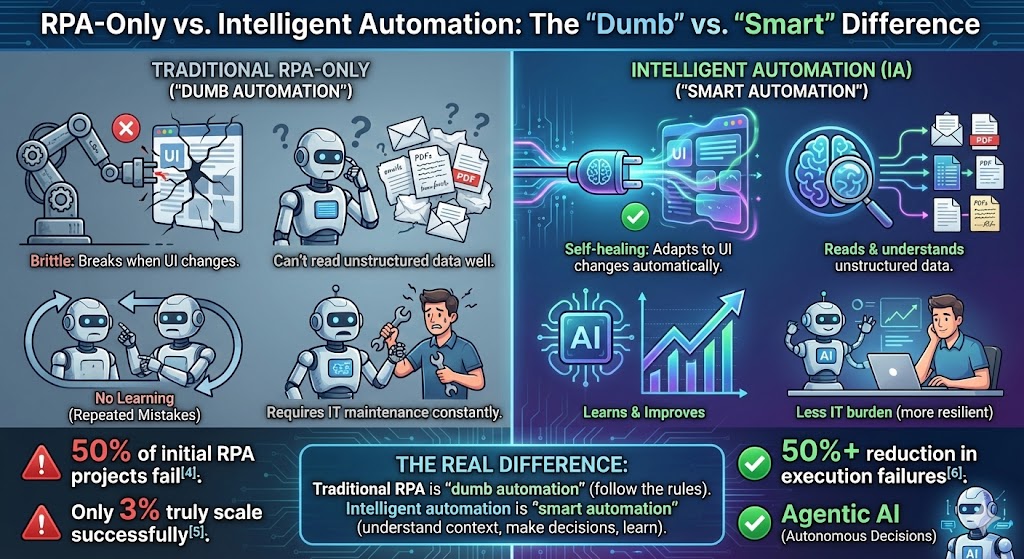
Traditional RPA Problems: – Brittle (breaks when UI changes) – Can’t read unstructured data well – No learning (same mistakes repeated) – Requires IT maintenance constantly – 50% of initial RPA projects fail – Only 3% truly scale successfully
Intelligent Automation Solutions: – Self-healing (adapts to UI changes automatically) – Reads and understands unstructured data (invoices, emails, documents in any format) – Learns and improves over time (AI model accuracy increases) – Less IT burden (more resilient, less breakage) – 50%+ reduction in execution failures – Agentic AI (latest generation AI agents that make decisions autonomously)
The Real Difference: Traditional RPA is “dumb automation” (follow the rules). Intelligent automation is “smart automation” (understand context, make decisions, learn).
High-Impact Automation Use Cases for GCC Enterprises
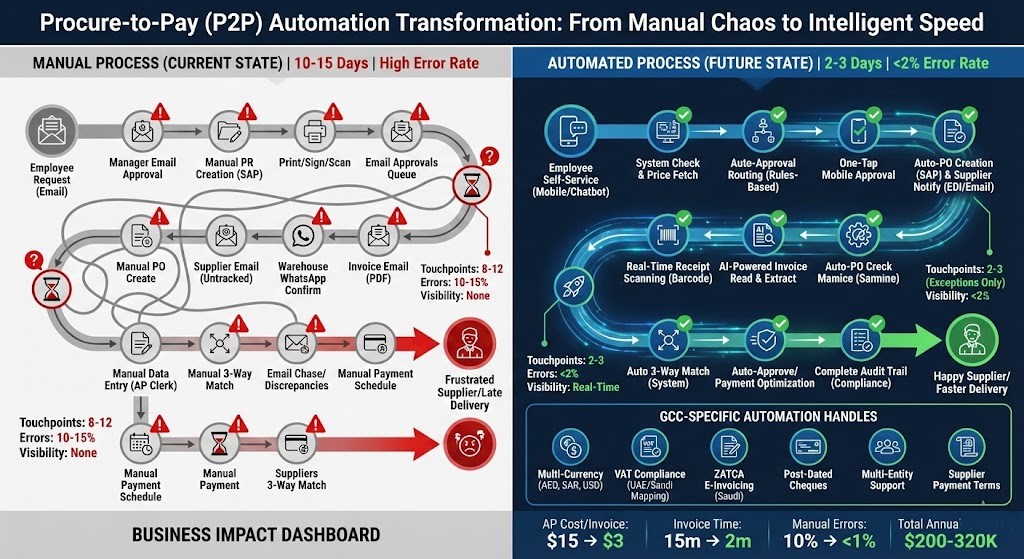
Use Case #1: Procure-to-Pay (P2P) Automation – Finance’s #1 Pain Point
The Manual Process (Current State in Most GCC Companies)
- Employee needs office supplies → Emails manager for approval → Manager emails Procurement
- Procurement team manually creates purchase requisition in SAP
- Requisition needs signatures → Prints, hand-signs, scans, emails to approvers
- Approvers check email, log into SAP, navigate to approval queue, approve
- Procurement creates PO, emails to supplier (via email untracked)
- Goods arrive → Warehouse emails receiving confirmation (via WhatsApp group?)
- Supplier invoice arrives via email → AP clerk manually opens PDF, copies vendor name/amount/GL code, types into SAP
- 3-way match (PO, receipt, invoice) done manually by AP analyst checking numbers
- Discrepancies discovered → Email chase with procurement/warehouse/supplier → Takes days to resolve
- When resolved → Finance schedules payment manually
- Payment processed → Manual bank entry (if not integrated)
Timeline: 10-15 days (for a simple purchase)
Touch points: 8-12 different people involved
Error rate: 10-15% (data entry mistakes, missing approvals, address errors)
Visibility: Nobody knows where a requisition is stuck requires status chasing via email
Supplier impact: Delayed PO issuance = supplier delays, late delivery, customer impact
Automated Process (Future State with Intelligent Automation)
- Employee request (self-service): “I need 50 reams of paper”
- Via mobile app or chatbot
- System checks approved supplier catalog, confirms availability
- Fetches price from contract
- Approval routing (automatic):
- System checks approval authority rules: “Items <$500 = budget owner approve, $500-$5K = manager approve, >$5K = director + CFO”
- Routes automatically based on employee level and amount
- Pushes mobile notification to approvers
- Approval flow (fast-tracked):
- Manager sees notification on phone (includes: what, who, why, cost, budget impact)
- One-tap approval (or reject with comment)
- Escalates if not approved within 24 hours (auto-reminder)
- PO creation (automatic):
- If approved → PO auto-created in SAP with correct GL code, cost center, payment terms
- Supplier automatically notified via EDI or email (system message, not manual)
- Receipt tracking (real-time):
- Goods arrive → Warehouse scans barcode (if barcoded) or QR code on PO
- SAP auto-updated (goods receipt posted immediately)
- Invoice matching (automatic):
- Supplier sends invoice (XML, email, or portal)
- AI reads invoice: Extracts vendor, amount, line items, GL codes
- System performs 3-way match automatically:
- Does vendor match the PO? ✓
- Does amount match within tolerance? ✓
- Does GL code match? ✓
- If all match → Auto-approved, scheduled for payment
- If exception → Routes to AP analyst (only 5% of invoices)
- Payment optimization (intelligent):
- System analyzes: Payment due date, cash position, early payment discounts available
- Recommends optimal payment date (e.g., “Pay 3 days early to capture 2% discount = $200 saved”)
- Executes payment on recommended date
- Compliance (complete audit trail):
- Every step logged: Who approved, when, from where, any exceptions
- Audit-ready (ZATCA compliant for Saudi, VAT compliant for UAE)
Timeline: 2-3 days (mostly supplier delivery time; approval same-day)
Touch points: 2-3 people (only for exceptions; ~5% of purchases)
Error rate: <2%
Visibility: Real-time status visible to all stakeholders
Supplier impact: PO issued same day, faster delivery
GCC-Specific Considerations Automation Handles
- Multi-currency: AED, SAR, USD, QAR automatic conversion at real-time rates
- VAT compliance: UAE 5% vs. Saudi 15% → Automatic GL code mapping
- ZATCA compliance (Saudi): E-invoicing with cryptographic signatures, real-time FATOORA submission
- Post-dated cheques: If supplier accepts PDCs, system schedules check printing and delivery
- Multi-entity: UAE entity vs. Saudi entity → Different GL structures, tax treatments automatically applied
- Payment terms by supplier: Some suppliers require prepayment, others accept 60-day terms → System manages per contract
| Metric | Before | After | Impact |
|---|---|---|---|
| AP processing cost per invoice | $15 | $3 | $120K annual savings |
| Invoice processing time | 15 minutes | 2 minutes | 542 hours/year saved |
| Manual data entry errors | 10% | <1% | Fewer disputes, better compliance |
| Late payment penalties | $50K/year | Near-zero | Supplier relationships improve |
| Early payment discounts captured | 20% | 95% | $80–120K additional savings |
| Total annual benefit | – | – | $200–320K |
| Initial investment | – | – | $80–150K |
| Payback period | – | – | 3–6 months |
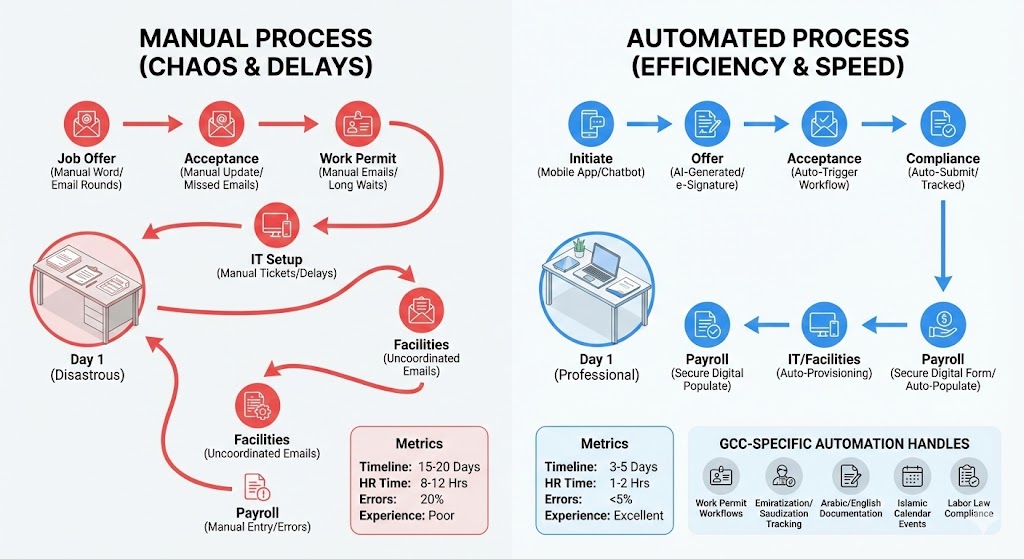
Use Case #2: Employee Onboarding Automation – HR Pain Point
The Manual Process (Current State)
Hiring a new employee in a GCC company triggers chaos across HR, IT, Facilities, Payroll, and Compliance:
- Job offer (HR):
- HR creates offer letter in Word (manually)
- Emails to hiring manager → Manager edits → Back to HR → Multiple rounds
- Eventually approved → Print, sign, scan, email to candidate
- Timeline: 1 week just to issue offer
- Acceptance (Candidate):
- Candidate accepts via email reply (not tracked systematically)
- HR manually updates SuccessFactors
- Manual process = delays, missing documents
- Work permit (Compliance):
- For expat hires: HR emails compliance team about visa/work permit
- Manual follow-up required
- Takes 2-4 weeks (depends on process)
- IT account creation (IT):
- HR emails IT: “Create accounts for Ahmed Al-Mansoori”
- IT logs requests into ticketing system
- IT manually creates: Email account, network login, SAP access, building access card
- Timeline: 3-5 days (if IT remembers)
- Facilities (Workspace):
- HR emails facilities: “Prepare workspace for new hire”
- Facilities manually assigns desk, orders equipment
- Nobody coordinates timing
- Equipment often arrives after start date
- Payroll (Finance):
- HR emails payroll: “Add to payroll”
- Payroll manually enters: Bank details, salary, deductions, tax info
- Errors common (typos in bank account, wrong salary code)
- Takes 1-2 weeks to set up
- First day (Disastrous):
- New hire arrives
- No laptop (IT still processing)
- No SAP access (not ready)
- No desk assigned (facilities behind)
- Gets stack of paper forms to fill out (manually)
- Productivity lost: Week 1 = orientation, not work
- Post-onboarding (Chaos):
- First two weeks = manual data entry across systems
- New hire spends time filling forms instead of learning job
- Duplicate data entry (HR fills SuccessFactors, Finance fills payroll, IT creates accounts)
Timeline: 15-20 days until employee is productive
HR admin time: 8-12 hours per new hire
Error rate: 20% (missing steps, wrong access, payroll errors, duplicates)
New hire experience: Poor (feels disorganized, unprofessional)
Compliance risk: Work permits tracked manually → risk of lapses
Automated Process (Future State)
- Hiring manager initiates (self-service):
- Manager uses mobile app or chatbot: “I need to hire a Senior Accountant in Dubai”
- System prompts for key info: Level, location, start date, budget code
- Takes 2 minutes
- Job requisition (automatic):
- System auto-generates requisition in SuccessFactors
- Routes for budget approval (manager’s budget checked automatically)
- Auto-posts to job board if approved
- Candidate selected (workflow):
- System notification sent to HR and hiring manager
- Approval workflow triggered
- e-Signature capability (offer letter signed digitally no printing)
- Offer generation (AI):
- System pulls from template: Company name, location, salary amount, start date
- Generates personalized offer letter (AI fills in details)
- e-Signature link sent to candidate
- Candidate signs digitally (tracked)
- Candidate accepts (automated onboarding trigger):
- Acceptance → Auto-triggers entire onboarding workflow
- Background & compliance (automated):
- For Saudi hires: Auto-submits work permit request to relevant authority
- For UAE hires: Automatically checks Emiratization requirements
- Tracks status (no manual follow-up needed)
- Compliance calendar auto-updated
- IT account provisioning (automatic):
- System auto-sends request to IT with:
- Employee name, email, start date, department, access level
- Pre-configured permissions (based on role)
- IT confirms completion → System validates
- Accounts created before start date (zero waiting)
- System auto-sends request to IT with:
- Facilities coordination (automatic):
- System sends workspace request to facilities with:
- Start date (facilities knows when to have desk ready)
- Equipment needs (based on role: Monitor, keyboard, phone, etc.)
- Facilities confirms equipment ordered and scheduled for delivery Day 1
- System sends workspace request to facilities with:
- Payroll setup (secure form):
- Candidate receives secure digital form:
- Bank details
- Emergency contacts
- Tax information
- Submits digitally (encrypted)
- System auto-populates payroll system (no manual re-entry)
- Candidate receives secure digital form:
- Pre-boarding (engagement):
- Candidate receives digital welcome packet (email):
- Company handbook (PDF)
- Organizational chart
- Culture video
- Benefits overview
- Day 1 schedule
- HR can measure engagement (opens, time spent)
- Candidate receives digital welcome packet (email):
- Day 1 experience (professional):
- Everything is ready
- Laptop on desk, all accounts created and tested
- New hire productivity: Day 1 learning actual job (not forms)
- Manager has onboarding checklist (system-generated, trackable)
- Post-onboarding (tracked):
- 30-60-90 day check-ins (automated reminders to manager)
- Feedback surveys (sent automatically)
- Compliance tracking (work permit renewal reminders)
Timeline: 3-5 days (mostly logistics)
HR admin time: 1-2 hours per hire (only exceptions)
Error rate: <5%
New hire experience: Excellent (feels organized, professional, valued)
Compliance risk: Zero (automated tracking of work permits, Emiratization, Saudization quotas)
GCC-Specific Considerations
- Work permit workflows: Different for UAE vs. Saudi vs. Qatar
- Emiratization/Saudization tracking: Automatically monitors hire mix, maintains compliance
- Arabic documentation: Offer letters in both English and Arabic
- Islamic calendar: HR events (Ramadan schedule changes) automatically managed
- End-of-service benefits: EOSB calculation (GCC labor law requirement) automated
- Labor law compliance: Multi-country differences automatically handled per location
Business Impact (for 500-person company, hiring 200/year)
| Metric | Before | After | Impact |
|---|---|---|---|
| Onboarding timeline | 15–20 days | 3–5 days | 12–17 days faster |
| HR admin time per hire | 8–12 hours | 1–2 hours | 1,400 hours/year saved (0.7 FTE) |
| New hire errors | 20% | <5% | Fewer payroll mistakes, compliance issues |
| Equipment ready Day 1 | 50% | 95% | Faster productivity ramp |
| Compliance risk | High (manual tracking) | Zero (automated) | Zero work permit lapses |
| Total annual benefit | – | – | $140K (labor) + Compliance |
| Initial investment | – | – | $40–80K |
| Payback period | – | – | 3–4 months |
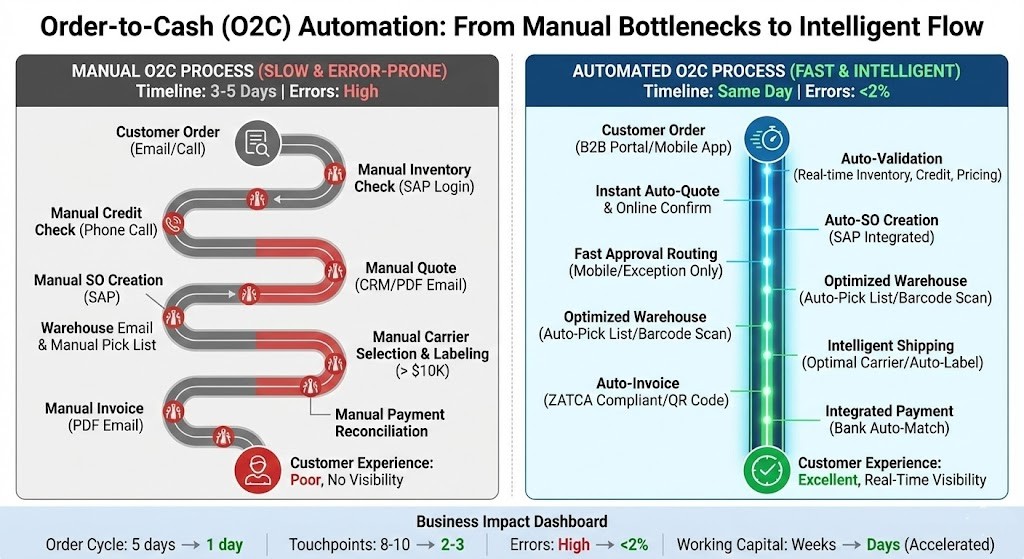
Use Case #3: Order-to-Cash (O2C) Automation – Sales Ops Pain Point
Current Manual Process
- Customer emails sales rep with order (or calls)
- Sales rep checks inventory (logs into SAP, manually checks stocks)
- Sales rep calls finance to check customer credit limit
- Sales rep manually creates quote in CRM (Salesforce)
- Sends PDF quote to customer via email
- Customer accepts → Sales rep manually creates sales order in SAP
- SO needs approval (if amount >$10K) → Sales rep emails manager → Manager logs in SAP, approves
- Warehouse gets email → Manually picks and packs (picks list created manually or printed)
- Shipping: Manually selects carrier (based on experience, not optimization)
- Goods shipped → Manual carrier label creation
- Invoice: Finance team manually creates invoice in SAP, emails to customer (PDF)
- Payment: Customer sends bank transfer → Finance manually reconciles (matches payment to invoice)
Timeline: 3-5 days for simple order
Touchpoints: 8-10 people
Errors: Wrong pricing, out-of-stock shipped, invoicing mistakes, payment mismatches
Customer experience: Slow, error-prone, no visibility (“When will my order arrive?”)
Working capital: Invoice to payment takes weeks
Automated Process
- Customer order placement:
- Via B2B portal (24/7 self-service)
- Or sales rep enters in mobile app
- Auto-validation (intelligent checks):
- Real-time inventory check across all warehouses
- Customer credit limit check (against credit management system)
- Pricing rules applied (customer contracts, volume discounts, regional pricing)
- Delivery date calculated (warehouse location to customer location + shipping time)
- Quote generation (instant):
- Quote auto-generated with all details
- Customer reviews and confirms online (not email PDF attachment)
- Confirmation time-stamped
- SO creation (automatic):
- Sales order auto-created in SAP from quote data
- GL code pre-filled (based on customer, product, region)
- Delivery address auto-populated
- Approval routing (fast):
- If within credit limit + standard terms → Auto-approved
- If exception (new customer, high-value, special terms) → Routes to sales manager via mobile notification
- Manager approves with one tap
- Warehouse execution (optimized):
- Pick lists generated automatically
- Optimized for shortest path (reduces picking time by 20-30%)
- Barcode scanning (updates SAP in real-time as picked)
- Shipping optimization (intelligent):
- System selects optimal carrier based on:
- Cost vs. speed tradeoff
- Customer’s preferred carrier
- Current capacity (to avoid delays)
- Generates shipping label automatically
- Notifies customer with tracking number (via email/SMS)
- System selects optimal carrier based on:
- Invoice (automatic):
- Generated automatically when goods shipped
- Sent electronically (ZATCA compliant for Saudi customers)
- Includes dynamic QR code (traceable, secure)
- Payment (integrated):
- Bank integration: Payment received → Auto-matched to invoice
- If mismatch: Flagged to finance (only 2-3% of payments)
- No manual reconciliation needed
- Customer visibility (real-time):
- Customer portal shows:
- Order status (confirmed, picked, shipped, delivered)
- Real-time tracking (if carrier provides)
- Invoice and payment status
- Reduces customer service inquiries by 40-50%
- Customer portal shows:
Timeline: Same day if in stock (vs. 3-5 days)
Touchpoints: 2-3 people (only exceptions)
Errors: <2%
Customer experience: Amazon-like (self-service, real-time status, transparent)
Working capital acceleration: 5-day to 1-day cycle = accelerated cash flow
Business Impact (for $200M company with 50 orders/day)
| Metric | Before | After | Impact |
|---|---|---|---|
| Daily order processing | 50 orders/day | 200 orders/day | 4× capacity |
| Processing per order | 2 hours | 30 minutes | 1.5 hr saved per order |
| Order cycle time | 5 days | 1 day | 4-day acceleration |
| Revenue acceleration | – | 4-day earlier cash | $5M accelerated (for $250M annual sales) |
| Errors | 10% | <2% | 90% reduction in order issues |
| Customer service calls | 100/month | 40/month | 60% reduction (self-service visibility) |
| Total annual benefit | – | – | $5M+ working capital + efficiency |
| Initial investment | – | – | $100–200K |
| Payback period | – | – | 1–2 months |
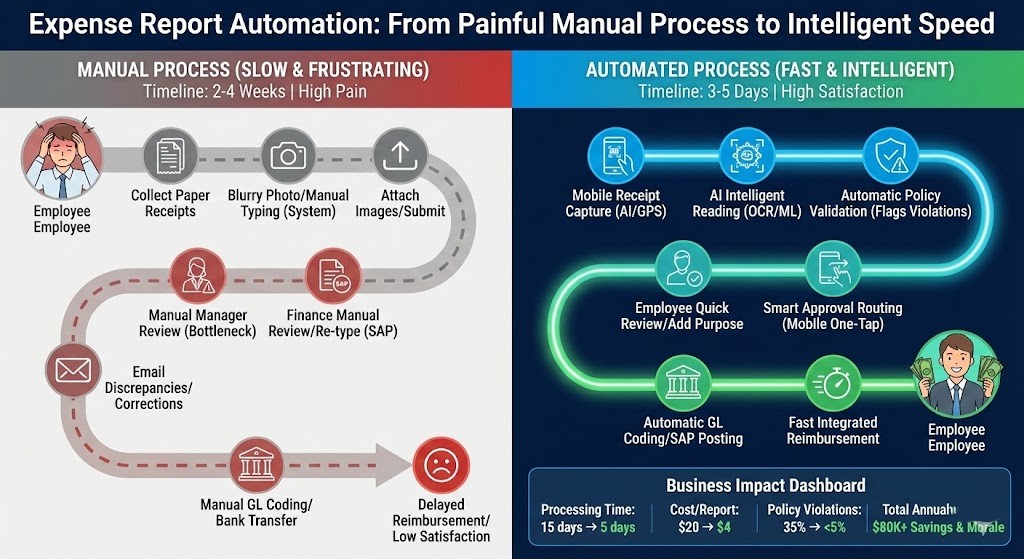
Use Case #4: Expense Report Automation – Employee Pain Point
Current Manual Process (Every employee hates this)
- Employee collects paper receipts for weeks
- Takes photos of receipts (blurry, incomplete)
- Logs into expense system, manually types each line item
- Attaches receipt images
- Submits → Goes to manager for approval
- Manager manually reviews (doesn’t really check details against policy)
- Approves → Sent to finance
- Finance manually reviews again, re-types data into SAP
- Discrepancies between submitted data and receipts → Email back to employee
- Employee corrects → Back to finance
- Finance enters into SAP, GL-codes to cost center
- Reimbursement: Manual bank transfer or added to payroll
- Delays: Takes 2-4 weeks to get paid back
Timeline: 2-4 weeks (submission to reimbursement)
Employee frustration: High (personal cash flow delayed)
Policy compliance: Low (managers don’t check details)
Finance burden: High (data entry, reconciliation, exceptions)
Fraud risk: Moderate (fake or inflated receipts hard to detect)
Automated Process
- Receipt capture (mobile-first):
- Employee takes photo of receipt with expense app
- Timestamp and GPS location captured automatically
- AI reading (intelligent):
- AI (OCR + ML) reads receipt:
- Merchant name
- Date
- Amount
- Category (meal, travel, office)
- Extracts currency and converts if foreign
- AI (OCR + ML) reads receipt:
- Policy validation (automatic):
- System checks against expense policy:
- “Meal alone: Max $50/day per diem”
- “Travel: Business class only if >4 hours”
- “Equipment: <$500 pre-approval, >$500 post-approval”
- Flags violations (e.g., “Meal exceeds $50 per diem by $15”)
- Suggests corrections
- System checks against expense policy:
- Employee review & correction:
- Employee sees AI extraction
- Reviews and corrects any errors (if policy flagged a violation)
- Can add business purpose (“Client dinner – Al Mansour project”)
- Approval routing (automatic):
- System routes based on amount:
- <$100 → Manager approves (mobile notification)
- $100-$500 → Manager + Director approve
- $500 → Director + CFO approve
- All approvals mobile (one tap)
- System routes based on amount:
- Policy compliance (already enforced):
- Because AI already checked policy, manager is just confirming legitimacy
- Compliance score: 95%+ (vs. 60% with manual)
- GL coding (automatic):
- System assigns GL code based on:
- Expense category (meal = Travel & Entertainment GL)
- Employee department
- Cost center
- Pre-filled in SAP
- System assigns GL code based on:
- Reimbursement (fast):
- Approved expenses auto-posted to SAP
- Scheduled for payment within 5 days
- Integrated with payroll or bank transfer (employee’s choice)
- Audit trail (complete):
- Receipt image attached
- Policy check documented
- Approval chain tracked
- GL coding recorded
- Audit-ready (ZATCA compliant, SAP-compliant)
Timeline: 3-5 days (submission to reimbursement)
Employee experience: Excellent (submit as you spend, fast reimbursement)
Policy compliance: 95% (AI enforces, not human judgment)
Finance burden: Low (only review ~5% of exceptions)
Fraud risk: Very low (AI detects anomalies)
Business Impact (for 500-person company)
| Metric | Before | After | Impact |
|---|---|---|---|
| Finance processing capacity | 200 reports/week | 800 reports/week | 4× capacity |
| Cost per expense report | $20 | $4 | $8K annual savings |
| Processing time | 15 days | 5 days | 10-day acceleration |
| Policy violations | 35% | <5% | Better compliance |
| Finance FTE for expenses | 1.5 FTE | 0.5 FTE | 1 FTE freed up ($50K saved) |
| Employee satisfaction | Low (slow reimbursement) | High (fast reimbursement) | Morale improves |
| Total annual benefit | – | – | $80K savings + morale |
| Initial investment | – | – | $30–60K |
| Payback period | – | – | 3–4 months |
The Technology: SAP BTP Explained (Simply)
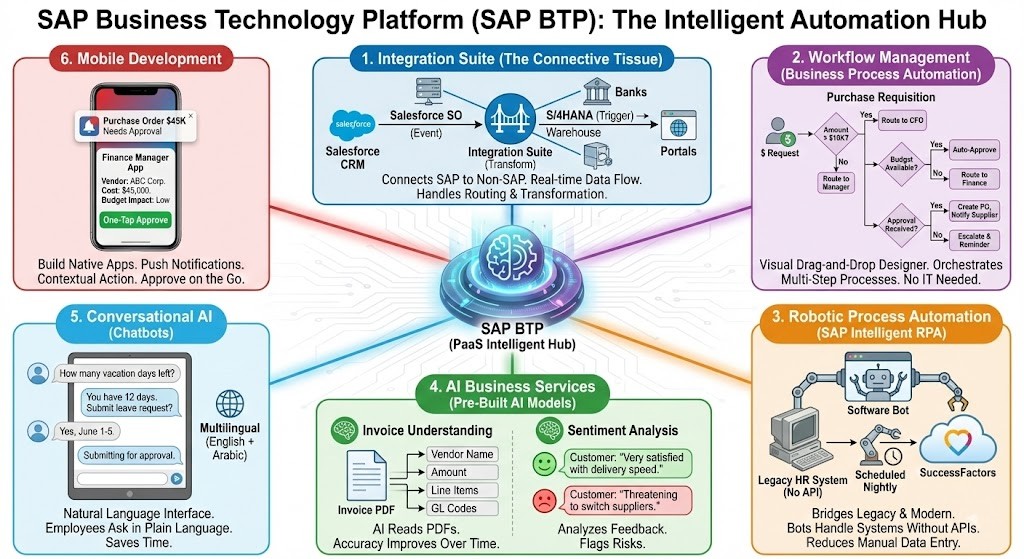
What is SAP Business Technology Platform (SAP BTP)?
SAP BTP is a platform-as-a-service (PaaS) that sits between your various systems and enables them to work together intelligently.
Think of it as:
Integration Hub: Connects SAP to non-SAP systems (Salesforce, HCM, banks, portals)
Workflow Engine: Orchestrates multi-step processes across systems
Development Platform: Build custom apps and workflows
AI/ML Services: Pre-built intelligence (invoice reading, anomaly detection)
Data Management: Store, process, and analyze data
Mobile App Development: Build employee-facing and customer-facing apps
Key Components for Automation
1. Integration Suite (The Connective Tissue)
Connects SAP to SAP and SAP to non-SAP systems:
Example: When sales order created in Salesforce CRM → Integration Suite captures event → Transforms data to SAP format → Pushes to S/4HANA → Triggers warehouse picking → Updates Salesforce SO status (All real-time, no manual steps)
- Benefit: Each system connects once to the platform; platform handles routing, transformation, error handling.
2. Workflow Management (Business Process Automation)
Example: Purchase requisition approval workflow – Employee submits requisition – Amount >$10K? – If yes → Route to CFO – If no → Route to manager – Budget available? – If yes → Auto-approve – If no → Route to finance for budget check – Approval received? – If yes → Create PO, notify supplier – If no → Escalate and send reminder (after 24 hours)
- All configured visually (drag-and-drop), no IT needed.
3. Robotic Process Automation (SAP Intelligent RPA)
When systems don’t have APIs, software bots handle it:
Example: Legacy HR system (no API) – Bot logs in to system – Extracts employee data (automatically scheduled, runs nightly) – Updates SuccessFactors with latest data
- Benefit: Bridges gap between legacy and modern systems.
4. AI Business Services (Pre-Built AI Models)
Pre-trained AI models no data scientists needed:
Invoice Understanding: AI reads invoice PDFs – Vendor name (even if spelled differently across suppliers) – Amount – Line items – GL codes – Accuracy improves over time (learns from corrections)
Purchase Order Matching: AI compares invoice to PO – Detects anomalies: “Amount 20% higher than PO requires review”
- Sentiment Analysis: Analyzes customer feedback - “Customer very satisfied with delivery speed” - Flags risk: “Customer threatening to switch suppliers”
2. Workflow Management (Business Process Automation)
Natural language interface employees ask questions in plain language:
Example HR Chatbot: – Employee: “How many vacation days do I have left?” – Chatbot queries SuccessFactors – Response: “You have 12 days remaining as of today. Would you like to submit a leave request?” – Employee says yes – Chatbot: “Select dates” (employee picks June 1-5) – Chatbot: “Submitting for approval to your manager” – Done (vs. logging into SuccessFactors, navigating menus, filling forms 5 minutes saved)
- Multilingual (critical for GCC English + Arabic).
6. Mobile Development
Build native apps for employees and customers:
Finance Manager Mobile App: – Push notification: “Purchase order $45K needs approval” – Manager opens app, sees context (what, who, why, cost) – Approves with one tap – (Vs. logging into SAP on desktop, navigating to approval queue 5 minutes saved)
Why SAP BTP vs. Alternatives?
Alternative #1: Standalone RPA (UiPath, Automation Anywhere) – Good for: Screen automation on legacy systems – Limitation: Not SAP-native, brittle (UI changes break bots), high maintenance
Alternative #2: Cloud iPaaS (MuleSoft, Dell Boomi) – Good for: Integration between systems – Limitation: Not SAP-specific, requires more configuration for SAP workflows
Alternative #3: Custom Development – Good for: Total control, exactly what you need – Limitation: Expensive, slow, requires specialized developers, risky
SAP BTP Advantage: – Native to SAP (built by SAP, understands SAP internals deeply) – End-to-end platform (integration + workflow + AI + mobile = everything in one) – Low-code/no-code (business users participate, not just IT) – Pre-built content (SAP has templates for common processes like P2P, O2C, HR) – Scales with SAP (as you upgrade S/4HANA, SAP BTP evolves with you)
When to Use SAP BTP: – If you run SAP ERP (S/4HANA, ECC, Business One) → SAP BTP is natural choice – If you need to integrate SAP with other systems → SAP BTP – If you want business users to design workflows → SAP BTP – If you want pre-built AI for business processes → SAP BTP
3-Year ROI: 514% according to SAP research
Implementation Roadmap: 6-Month Automation Program
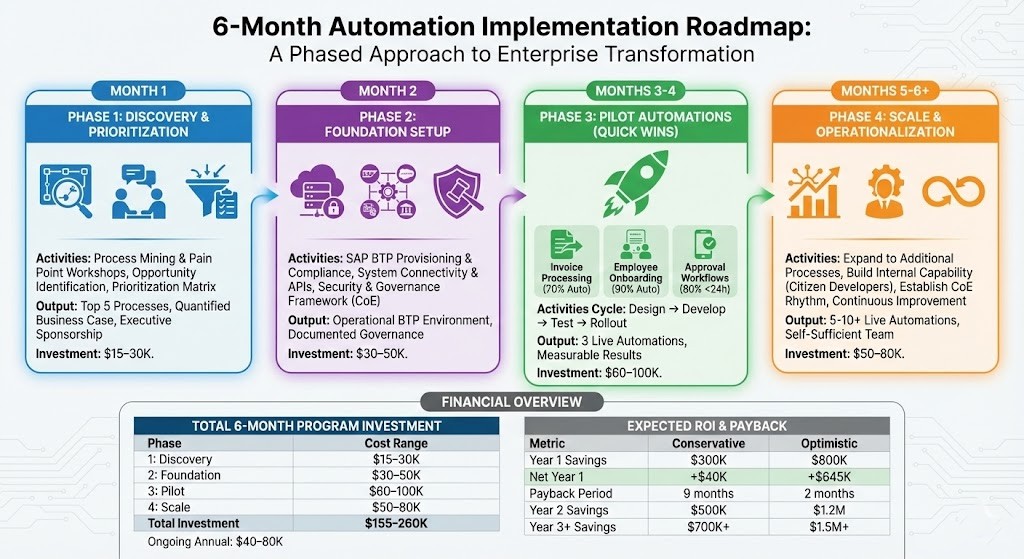
Phase 1: Discovery & Prioritization (Month 1)
Activities:
Process Mining Workshop: – Map current processes: Where do employees actually spend time? – Use tools (process mining software, time tracking) to understand reality – Typical finding: “We thought invoice processing took 5 minutes; it’s actually 15 minutes including email checking, system login, manual matching”
Pain Point Workshops (Interview 15-20 employees): – Ask: What’s most frustrating about your daily work? – Typical answers: “Chasing approvals,” “Data entry from PDF,” “Waiting for spreadsheet updates” – Ask: What would change if this were automated? – Typical answer: “I could do actual analysis instead of data entry; I’d have 5 hours/week back”
Opportunity Identification: – Create list of 20-30 potential automation candidates
Volume: How many instances per day/month?
Manual Effort: Hours spent per instance?
Error Rate: How often does it go wrong?
Compliance Risk: Audit implications?
Employee Impact: Morale/satisfaction impact?
Customer Impact: Affects customer experience?
Prioritization Matrix:
| Process | Volume / Month | Hours / Instance | Impact Score | Priority |
|---|---|---|---|---|
| Invoice Processing | 1000 | 0.25 | High | 1 |
| Purchase Req Approval | 500 | 0.5 | High | 2 |
| Employee Onboarding | 20 | 10 | High | 3 |
| Expense Reports | 300 | 0.33 | Medium | 4 |
| Sales Order Processing | 100 | 1 | High | 5 |
Output: – Top 5 processes identified for automation – Business case quantified for each (current cost, automation cost, ROI, payback period) – Executive sponsorship secured (“CFO says this is priority”)
Investment: $15-30K (consulting workshops, process mining tool license)
Phase 2: Foundation Setup (Month 2)
Activities:
SAP BTP Provisioning: – Establish cloud environment (sandbox/test/production) – Secure compliance setup (data residency UAE/Saudi data centers)
System Connectivity: – Audit existing systems: What systems need to talk? – SAP S/4HANA (transactional hub) – Salesforce (CRM) – SuccessFactors (HR) – Banks (payments) – Any others? – Set up APIs or data connections – Test connectivity (ensure data flows correctly)
Security & Access Control: – Define: Who can create workflows? (Should be business analysts, not just IT) – Data security: What sensitive data flows through automations? – Audit trail: All actions logged for compliance
Governance Framework: – Form Automation Center of Excellence (CoE): – Members: IT architect, process owner, business analyst, finance sponsor – Cadence: Monthly meetings – Define standards: – Workflow naming conventions – Exception handling procedures – Change management process – Create templates: – Approval workflow template (standardizes how approvals work) – Error handling template (standardizes error notifications)
Output: – SAP BTP environment operational – Governance framework documented – Security policies in place
Investment: $30-50K (SAP BTP licenses year 1, consulting setup)
Phase 3: Pilot Automations (Months 3-4)
Implement 2-3 Quick Wins:
Quick Win #1: Invoice Processing (16 hours labor saved/week) – Automate: Invoice PDF → Extract data → 3-way match → Auto-approve clean invoices – Target: 70% of invoices auto-processed (exceptions routed to AP) – ROI: Breaks even in 4 weeks
Quick Win #2: Employee Onboarding (8 hours labor saved/hire) – Automate: Offer generation → e-signature → IT/Facilities trigger → Payroll setup – Target: 90% of steps automated – ROI: Breaks even in 2-3 months (hiring costs money anyway, why not automate?)
Quick Win #3: Approval Workflows (Faster decisions) – Automate: PO/Expense/Leave approval routing based on rules – Target: 80% of approvals processed within 24 hours (vs. 3-5 days) – Benefit: Employee satisfaction (fast decisions), compliance (audit trail)
Activities for Each: – Design (2 weeks): – Map current state vs. desired state – Design workflows visually (using SAP BTP tools) – Identify data sources and targets – Plan error handling
- Development (3 weeks):
- Build integrations (ERP to BTP, BTP to other systems)
- Configure AI models (train invoice reader on your supplier formats)
- Build mobile/web UI (if needed)
- Build test data sets
- Testing (2 weeks):
- User acceptance testing (involve end users)
- Process testing (does workflow handle edge cases?)
- Integration testing (data flows correctly between systems?)
- Performance testing (can it handle peak volumes?)
- Rollout (1 week):
- Training (how to use, what to expect)
- Go-live (limited scope first, expand gradually)
- Support (team standing by to help)
Output: – 3 automations live in production – Measurable results (time saved, errors reduced, approvals accelerated) – User feedback (what to improve for next phase)
Investment: $60-100K (development, consulting, training)
Phase 4: Scale & Operationalization (Months 5-6 and Beyond)
Expand to Additional Processes: – Order-to-cash automation – Supply chain visibility – Customer service workflows – Whatever is next on priority list
Build Internal Capability: – Identify “citizen developers” (business analysts who can build workflows) – Train them on SAP BTP (1-week bootcamp) – Empower them to build additional automations with consulting support
Establish CoE Operating Rhythm: – Monthly meetings: Review status, discuss new opportunities, troubleshoot – Quarterly reviews: ROI tracking, lessons learned – Annual strategy: Automation roadmap for next year
Continuous Improvement: – Monitor bot performance (success rate, processing time) – Gather user feedback (what’s working, what’s frustrating?) – Optimize workflows (remove bottlenecks, handle new edge cases) – Expand AI training (improve accuracy)
Output: – 5-10+ automations live – Internal team capable of continuing (not dependent on external consultants) – Automation roadmap and backlog for next 12 months
Investment: $50-80K (additional development, training, optimization)
Total 6-Month Program Investment
| Phase | Cost Range | What’s Included |
|---|---|---|
| Phase 1: Discovery | $15–30K | Workshops, process mining, business case |
| Phase 2: Foundation | $30–50K | SAP BTP licensing, setup, governance |
| Phase 3: Pilot | $60–100K | Development, AI training, testing, training |
| Phase 4: Scale | $50–80K | Additional automations, capability building |
| Total Investment | $155–260K | Complete automation program |
| Ongoing Annual | $40–80K | SAP BTP licenses, maintenance, optimization |
Expected ROI & Payback
| Metric | Conservative | Optimistic |
|---|---|---|
| Year 1 Savings | $300K | $800K |
| Implementation Cost | $260K | $155K |
| Net Year 1 | +$40K | +$645K |
| Payback Period | 9 months | 2 months |
| Year 2 Savings | $500K | $1.2M |
| Year 3+ Annual Savings | $700K+ | $1.5M+ |
A Real Middle East Success Story: Engineering & Procurement Company
Company Profile
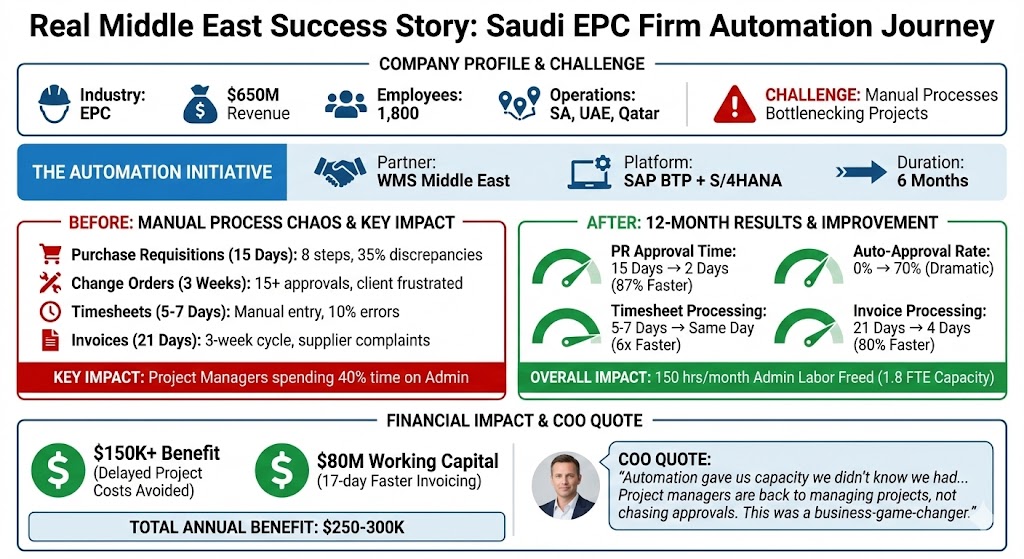
Name: Saudi Engineering & Construction Firm (composite example)
Industry: EPC (Engineering, Procurement, Construction)
Revenue: $650M annually
Employees: 1,800
Operations: Saudi Arabia (HQ), UAE, Qatar
Challenge: Large, complex projects require many approvals; manual processes bottleneck project execution
The Problem: Manual Process Chaos
EPC projects are process-intensive. A typical project workflow:
Purchase Requisitions: Employee requests materials → Approvals loop (project manager, site engineer, procurement, finance) → Takes 10-15 days → By the time PO issued, timeline slipped
Change Orders: Client requests mid-project changes → Requires 15+ approvals → Can take 3 weeks → Delays project → Client frustrated
Timesheets: Site workers submit weekly timesheets → Submitted to supervisor → Supervisor reviews manually → Submitted to HR → HR data-enters into payroll system → Takes 5-7 days → Workers frustrated (delayed payment)
Invoices: Suppliers issue invoices → Manual data entry into SAP → 3-week cycle → Suppliers complain about slow payment → Damaged relationships
Key Impact: Project managers spending 40% of their time on admin work (approvals, timesheets, invoices) instead of managing projects
The Automation Initiative
Partner: WMS Middle East
Platform: SAP BTP + SAP S/4HANA
Duration: 6 months (discovery to scale start)
Investment: $300K
Phase 1 & 2: Discovery & Foundation (Months 1-2)
Process Mining Results: – Purchase requisitions: 15 days average, 8 approval steps, 35% had discrepancies – Change orders: 20 days, 15 approval steps (super complex) – Timesheets: 5-7 days, 3 approval steps, 10% had errors (manual data entry) – Invoices: 21 days, multiple reconciliation steps
Prioritization: 1. Purchase requisitions (high volume, high impact on project timeline) 2. Timesheets (high volume, employee frustration) 3. Invoice processing (supplier relationships) 4. Change orders (future phase)
Foundation Setup: – SAP BTP environment provisioned in Saudi Arabia (data residency compliant) – Connectivity to S/4HANA, SuccessFactors, banking system established – Governance framework and CoE formed
Phase 3: Pilot Automations (Months 3-4)
Automation #1: Purchase Requisition Approval
Current: 15 days, manual routing, email approvals
Automated:
- Employee submits PR via mobile app
- System evaluates: Amount, project budget, category
- Routes automatically: <$50K = Project Manager approve, $50-200K = Director + Finance, >$200K = Director + CFO + COO
- Approvals via mobile (push notification, one-tap approve)
- Auto-creates PO if approved, emails supplier electronically
- Escalates if not approved within 24 hours
Results (3 months in):
- Timeline: 15 days → 2 days
- Approval success rate: 70% auto-approved (no human needed)
- 30% escalated (real issues, needs human judgment)
- Project managers: 5-7 hours/week freed up
Automation #2: Timesheet Processing
Current: 5-7 days, manual data entry, 10% error rate
Automated:
- Site workers submit via mobile app (offline-capable, submits when connected)
- GPS automatically captured (worker location verification)
- AI reads handwritten notes (if not using form)
- Auto-routes to supervisor for approval
- If approved: Auto-posted to SuccessFactors payroll
- If discrepancy: Flagged for supervisor review
Results (3 months in):
- Timeline: 5-7 days → Same day (submitted → Approved → Payroll updated)
- Error rate: 10% → <2%
- Employee satisfaction: Dramatically improved (paid on time, no delays)
- HR/Payroll team: 15 hours/week freed up
Automation #3: Invoice Processing
Current: 21 days, multiple reconciliation steps, supplier complaints
Automated:
- Supplier submits invoice (email, portal, or EDI)
- AI reads invoice, extracts data
- 3-way match (PO, receipt, invoice) automatic
- Clean invoices: Auto-approved, payment scheduled
- Discrepancies: Flagged to AP (only 5-8% of invoices)
Results (3 months in):
- Timeline: 21 days → 4 days
- Supplier payment satisfaction: Dramatically improved
- Finance team: 20 hours/week freed up for analysis vs. data entry
Phase 4: Scale (Months 5-6 and Beyond)
Expanded Automations: – Change order workflow (complex, lots of rules, future phase) – Material tracking (GPS on equipment shipments) – Site incident reporting (mobile app for safety events) – Project financial dashboard (real-time cost tracking)
Internal Capability: – Trained 5 power users on SAP BTP – Created library of workflow templates (reusable) – Established automation backlog (20 additional opportunities identified)
12-Month Results (Post-Go-Live)
| Metric | Before | After | Improvement |
|---|---|---|---|
| Procurement | |||
| PR approval time | 15 days | 2 days | 87% faster |
| Auto-approval rate | 0% | 70% | Dramatic |
| Project delay due to procurement | Frequent | Rare | Competitive advantage |
| Timesheet | |||
| Processing time | 5–7 days | Same day | 6× faster |
| Error rate | 10% | <2% | 80% reduction |
| Worker satisfaction | Frustrated | Happy | Higher retention |
| Invoice | |||
| Processing time | 21 days | 4 days | 80% faster |
| Supplier satisfaction | Complaints | Improved | Better relationships |
| Finance labor | 20 hrs/week | 5 hrs/week | 1 FTE freed |
| Overall | |||
| Admin labor freed | – | 150 hours/month | 1.8 FTE capacity |
| Take-on more projects | Limited by process | Capacity-enabled | Business growth |
| Financial Impact | |||
| Project manager productivity | 40% admin | 15% admin | 25% freed |
| Finance FTE savings | – | $50K/year | |
| Delayed project costs avoided | $200K+/year | $150K+/year | $150K+ benefit |
| Faster invoicing | Delayed cash flow | 17-day acceleration | $8M working capital |
| Total Annual Benefit | – | – | $250–300K |
COO Quote
“Automation gave us capacity we didn’t know we had. Our procurement, finance, and HR teams are handling 30-40% more volume than last year with the same headcount. And more importantly, our project managers are back to managing projects, not chasing approvals. This was a business-game-changer.”
Getting Started: 3 Approaches
Option 1: Build In-House
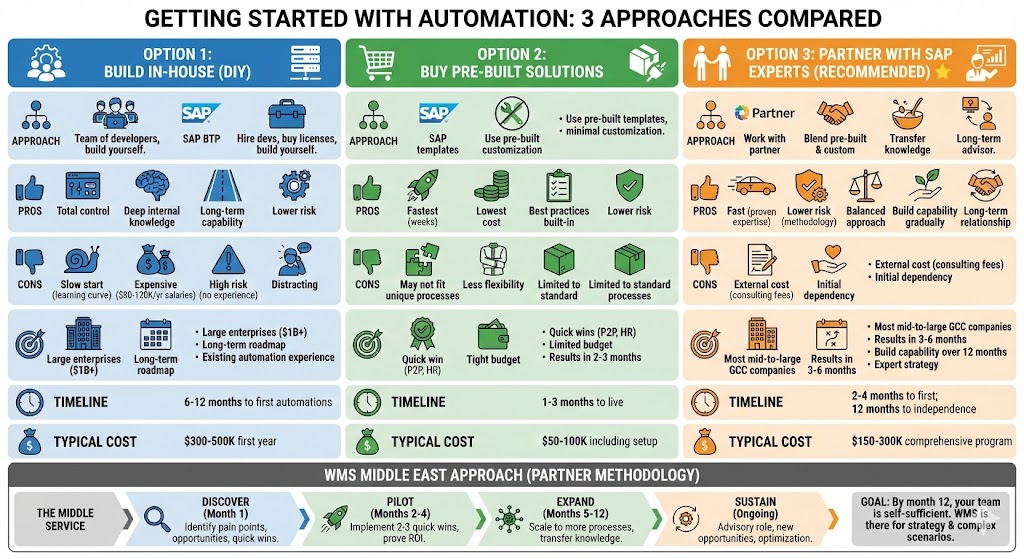
Approach: Hire automation developers, buy SAP BTP licenses, build yourself
Pros: – Total control – Build deep internal knowledge – Long-term capability
Cons: – Slow start (learning curve) – Expensive (developer salaries: $80-120K/year in GCC) – High risk (might build wrong things with no experience) – Distracting (developers distracted from other priorities)
When It Makes Sense: – Large enterprises ($1B+ revenue) with spare IT capacity – Long-term automation roadmap (many processes, not just 1-2) – Already have some automation experience
Timeline: 6-12 months to first automations
Typical Cost: $300-500K first year
Option 2: Buy Pre-Built Solutions
Approach: Use SAP’s pre-built templates and configurations, minimal customization
Pros: – Fastest (weeks to deploy) – Lowest cost (no development needed) – Best practices built-in – Lower risk (proven solutions)
Cons: – May not fit unique processes perfectly – Less flexibility – Limited to standard processes
When It Makes Sense: – Need quick wins on standard processes (P2P, HR, expense) – Limited budget – Want results in 2-3 months
Timeline: 1-3 months to live automations
Typical Cost: $50-100K including setup
Option 3: Partner with SAP Experts (Recommended for Most) ⭐
Approach: Work with SAP partner like WMS Middle East – Partner brings expertise and proven methodology – Blend pre-built solutions with customization – Transfer knowledge to your team over 12 months – Partner becomes advisor long-term
Pros: – Fast (partner has done this 50+ times) – Lower risk (proven approach, lessons learned) – Balanced (pre-built for speed, custom where needed) – Build internal capability gradually – Long-term relationship (not one-time project)
Cons: – External cost (consulting fees) – Initial dependency on partner
When It Makes Sense: – Most mid-to-large GCC companies – Want results in 3-6 months – Want to build internal capability over 12 months – Want expert guidance on automation strategy
Timeline: 2-4 months to first automations; 12 months to independence
Typical Cost: $150-300K comprehensive program
WMS Middle East Approach
- Discover (Month 1): Identify your pain points, opportunities, quick wins
- Pilot (Months 2-4): Implement 2-3 quick wins, prove ROI
- Expand (Months 5-12): Scale to more processes, transfer knowledge
- Sustain (Ongoing): Advisory role, help with new opportunities, optimization
Goal: By month 12, your team is self-sufficient. WMS is there for strategy and complex scenarios.
Overcoming Common Objections
Objection #1: “Automation Will Eliminate Jobs”
Reality: Automation eliminates tasks, not jobs.
In GCC, especially with Emiratization and Saudization targets, you need productivity per employee, not employee reduction. The employee who spent 40% of time on data entry now spends 15% on data entry (remaining 25% shifted to higher-value work). With company growth, you don’t hire replacement; you redirect them to analysis, customer service, problem-solving.
Example: Fatima (from opening) spent 40% on approvals/data entry. After automation, she spends 15% on exceptions/reviews, 85% on actual operational analysis and improvement projects. Her role became more interesting, more strategic, higher paid.
Objection #2: “Our Processes Are Too Unique to Automate”
Reality: 70-80% of enterprise processes are standard[8].
P2P, O2C, HR, Finance, Service these are the same in every company. Where they differ is the 20% approval hierarchies, compliance rules specific to your industry. Automate the 80% (quick wins, high ROI). Custom development the 20%.
Reality #2: “Unique” often means “never documented or optimized.” When you map it out, you find 60% of “unique” work is actually waste. Automation forces you to optimize.
Objection #3: “We Tried RPA Before and Bots Keep Breaking”
Reality: Old-school RPA (screen scraping) is brittle.
When SAP changed UI in last upgrade, your RPA bots broke. You had to call UiPath to fix. Frustrating.
Modern approach: SAP BTP doesn’t screen-scrape. It integrates at the data/API level. When SAP UI changes, the bot doesn’t care it’s talking to data layer, not clicking buttons. Self-healing architecture adapts automatically.
Objection #4: “This Sounds Expensive and Takes Years”
Reality: Pilot automations: $50-150K, takes 2-3 months.
Not years. Not risky. Prove ROI on 2-3 quick wins, then decide about expanding.
Payback: 6-12 months typical. For invoice processing, potentially 2-3 months (even a small company processing 500 invoices/month saves significant time).
Objection #5: “We Don’t Have IT Resources”
Reality: That’s why low-code/no-code matters.
Business analysts (not just IT developers) can build workflows. Finance analyst who understands the process can design and deploy the automation. IT handles integration and support.
If truly resource-constrained, partner with WMS we provide the resources during pilot/implementation phases.
Objection #6: “What If the System Goes Down?”
When systems do go down (rare), processes revert to manual (your current baseline). You’re no worse off. Plus, automation reduces dependency on individual employees if Fatima is on vacation, the invoice processing still happens (bot doesn’t take vacation).
Objection #7: “Our Users Will Resist Change”
Reality: Employees resist change that makes their lives harder.
Automation makes their lives easier (less manual work, faster approvals, fewer errors). In our experience, employee adoption is high when automation removes pain points.
Key to success: Involve users in design. “How would you want this to work?” makes them feel heard and builds ownership.
The GCC Context: Why Now Is Critical
Saudi Vision 2030 Pressure
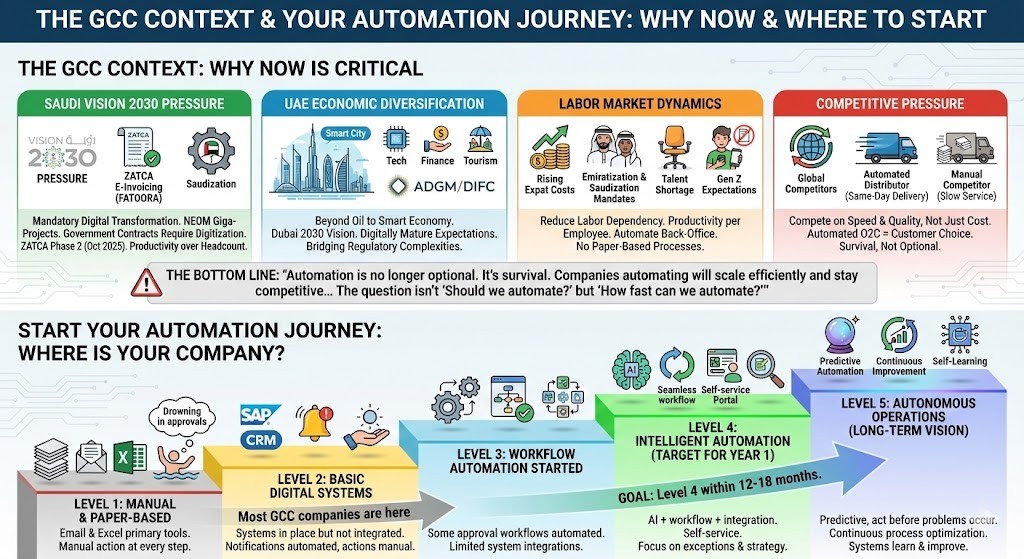
Saudi Arabia’s government is mandating digital transformation. Giga-projects like NEOM embed automation. Government contracts now prefer (soon will require) digitized suppliers.
E-invoicing Mandate (ZATCA): All Saudi VAT-registered companies must use ZATCA e-invoicing and integrate with FATOORA platform (Phase 2, ongoing through Oct 2025)[9]. Companies doing this via intelligent automation have competitive advantage over those doing it manually.
Localization Programs: Mandatory Saudi content in projects, Saudization hiring quotas. You need productivity per employee, not headcount. Automation enables this.
UAE Economic Diversification
UAE is moving beyond oil to tech, finance, tourism, advanced manufacturing. Dubai 2030 vision includes smart city and smart economy. Companies are expected to be digitally mature.
Free zones (ADGM, etc.) have different regulatory frameworks helps bridge these complexities.
Labor Market Dynamics
- Expat labor costs rising: Automation reduces labor dependency
- Local hire mandates increasing: Emiratization/Saudization quotas require productivity per employee
- Talent shortage in admin roles: Automating back-office work reduces hiring dependency
- Young workforce expectations: Gen Z won’t tolerate paper-based processes
Competitive Pressure
Global companies entering GCC with automated processes. Can’t compete on cost alone; must compete on service speed and quality. Automation enables this.
Example: Distributor automating O2C processes can promise same-day order processing and next-day delivery. Competitor not automating can’t match. Customer chooses automated company.
The Bottom Line
“Automation is no longer optional. It’s survival. Companies automating will scale efficiently and stay competitive. Companies not automating will be constrained by manual processes, lose talent to competitors, and struggle to meet government digital mandates.
The question isn’t ‘Should we automate?’ but ‘How fast can we automate?’”
Start Your Automation Journey
Where Is Your Company?
step – Email and Excel are primary workflow tools – Symptom: “We’re drowning in approvals and data entry”
Level 2: Basic Digital Systems – Systems in place (SAP, CRM) but not integrated – Notifications automated but actions manual – Symptom: “We have digital systems but still do everything manually”
Level 3: Workflow Automation Started – Some approval workflows automated – Some integrations between systems – Symptom: “We’ve automated some processes but many remain manual”
Level 4: Intelligent Automation (Target for year 1) – AI + workflow + integration working together – Self-service for employees – Symptom: “Most routine processes are automated; team focuses on exceptions and strategy”
Level 5: Autonomous Operations (Long-term vision) – Predictive automation (act before problems occur) – Continuous process optimization – Symptom: “Our systems learn and improve themselves”
Most GCC companies are at Level 1-2. Goal: Level 4 within 12-18 months.
Next Steps
☐ Free Process Automation Assessment
Identify your top 10 automation opportunities (2-hour workshop with WMS Middle East) – Process mining analysis – Pain point assessment – Quick wins identification – ROI estimation
☐ Automation Opportunity Document
Detailed breakdown of 5 high-priority opportunities: – Current state mapping – Future state design – Implementation timeline – Investment estimate – ROI projection
☐ Pilot Program Proposal
90-day roadmap and budget for 2-3 quick wins: – Detailed scope – Weekly timeline – Resource requirements – Success metrics – Investment breakdown
☐ Peer Case Studies
See how similar GCC companies are automating: – Manufacturing companies – Distribution/Retail companies – Oil & Gas companies – Financial institutions
☐ SAP BTP Demo
See automation in action specific to your industry
To ensure seamless project governance, consult with an accredited SAP implementation partner in Dubai with proven regional experience.
The automation journey doesn’t start with technology it starts with understanding your pain points. Let’s identify where automation can have the biggest impact for your company.
Contact WMS Middle East for a free assessment.
Frequently Asked Questions (FAQs)
Do we need to replace our SAP system to use SAP BTP?
No. SAP BTP works with SAP S/4HANA, SAP ECC, SAP Business One, and even non-SAP systems. It’s an add-on that enhances your existing ERP, not a replacement. If you’re planning an ERP upgrade to S/4HANA anyway, perfect timing for SAP BTP implementation.
Can we automate processes that span SAP and non-SAP systems (like Salesforce, HCM, banks)?
Yes. That’s exactly what SAP BTP excels at. Integration Suite has pre-built connectors for 300+ systems (SAP and non-SAP). You can orchestrate workflows across your entire tech stack.
Do we need developers to build automations?
Not for most workflows. SAP BTP has low-code/no-code tools. Business analysts (not just IT) can design and deploy workflows visually. Complex integrations or custom AI might need developers, but 80% of the work is business-user friendly.
What if our process changes? Do we rebuild the automation?
No. Workflows are easy to modify (visual designer). That’s advantage of BTP over custom code. Change the rule visually → Deploy → Done. Typically takes 1-2 days vs. weeks for code changes.
How long before we see ROI?
Pilot automations (2-3 processes) typically show ROI within 6-12 months. Simple automations (like approval workflows) can pay back in weeks. Complex automations (multi-system orchestration) typically 6-12 months. On average, companies achieve 240% ROI in 9 months
Can this work for Arabic language and GCC-specific processes?
Yes. SAP BTP supports Arabic in workflows and UIs. AI models can read Arabic documents (OCR works for Arabic invoices, receipts, etc.). Workflows can be configured for GCC specifics: Multi-currency (AED, SAR, USD, QAR), VAT rate differences, ZATCA compliance (Saudi), different fiscal year rules, etc.
What happens if an automated process fails?
Workflows have built-in error handling. If something fails: 1. System logs the error (audit trail) 2. Routes to human for action (escalation path) 3. Failed process doesn’t disappear—it surfaces for review 4. Team is notified (doesn’t sit stuck)
It’s actually safer than manual (where things fall through cracks without anyone noticing).
Will our employees resist automation?
Usually no—when automation removes painful tasks. Employees frustrated with data entry, approval delays, and manual work are enthusiastic about automation.
Key to adoption: – Involve them in design (“How would you want this to work?”) – Show them the benefit (less tedious work, more interesting work) – Train them well (so they understand how to use automated systems) – Start with high-pain processes (quick wins build momentum)
Do we have to automate everything at once?
No. Recommended approach: Start with 2-3 high-impact processes (pilot), prove ROI, build internal confidence. Then expand to additional processes. Iterative approach reduces risk and builds momentum.
Most successful companies: Automate 3-4 processes in year 1, then 5-10 in year 2 as internal capability builds.
What’s typical investment for a 6-month pilot program?
$155-260K including: – Discovery & business case ($15-30K) – Platform setup & governance ($30-50K) – Pilot automations (2-3 processes) ($60-100K) – Scaling preparation ($50-80K) – Training & change management (included)
Ongoing annual: $40-80K for SAP BTP licenses and maintenance.
Payback: $300-800K annually depending on scope, so ROI typically 2-5x in year 1.
Can we start with one department (Finance) and expand later?
Absolutely. Common approach. Finance automations (P2P, expense, invoice processing) are typically quick wins. Start there, prove ROI, expand to HR, Operations, Sales, etc.
We’re planning an ERP upgrade. Should we wait to implement automation?
Consider timing. If upgrading in <6 months, might make sense to wait (coordinate implementation). If >12 months away, automate now on current system—your automations migrate to new system afterward.
Best approach: Discuss with your SAP implementation partner. Usually they can coordinate both initiatives.

Mahitab Maher
SAP professional specializing in SAP products, helping companies turn complex processes into smooth, scalable operations.
References & Data Sources
[1] 40-60% of labor on non-value-added tasks (based on automation opportunity assessments across enterprises)
[2] 240% ROI within 6-9 months of business process automation (ARDEM Research on BPA ROI)
[3] 30-50% cost reduction in affected processes (Gartner research on automation adoption)
[4] 50% of initial RPA projects fail (McKinsey/Deloitte studies on RPA adoption)
[5] Only 3% of companies truly succeed at scaling RPA (industry surveys)
[6] 50%+ reduction in execution failures with Generative AI (based on recent articles)
[7] 514% three-year ROI for SAP BTP (SAP official marketing materials)
[8] 70-80% of enterprise processes are standard across companies (McKinsey Process Excellence research)
[9] ZATCA e-invoicing Phase 2 integration by October 2025 (Saudi Arabia tax authority mandate)
Based on research from: SAP BTP 2025 capabilities, ASUG Report on SAP BTP adoption, McKinsey automation studies, Gartner process automation research, Deloitte RPA analysis, Middle East industrial automation market data (Mordor Intelligence), ZATCA Saudi Arabia e-invoicing requirements, WMS Middle East case studies and implementation experience.


This article clearly explains how SAP BTP supports intelligent automation strategies. Very relevant for enterprises aiming to improve operational efficiency.
Thank you, Richard. SAP BTP plays a key role in enabling scalable automation across enterprise systems. We’re glad the insights were helpful.
Good read. Automation is becoming a real priority for many companies now, especially when teams are dealing with multiple systems.
Thanks David, glad you found it useful. Automation definitely helps simplify things when systems start getting complex.
Automation is becoming more important than ever. Nice to see how SAP BTP fits into this.
Thanks Ryan, glad you found it useful. SAP BTP really helps bring different processes together.
Automation is becoming essential now. Good explanation of how SAP BTP supports that shift.
Thanks Omar. It’s definitely becoming a priority for many organizations.