

Last Updated 28/08/2026
Executive Summary
- Strategic Overview: Comprehensive guidance on virtual assistants for enterprise data: conversing with your systems like never before tailored for Middle East and GCC enterprises.
- Key Advantage: Eliminates departmental silos, standardizes reporting, and accelerates operational agility.
- Next Step: Consult with certified WMS Middle East SAP experts for tailored architecture sizing and cost estimation.
It’s 3 PM Sunday in Riyadh. The CEO is in a board meeting. A board member asks: “What percentage of our revenue comes from our top 5 customers?”
The CEO looks at the CFO. The CFO looks at the Finance Manager. The Finance Manager says: “I’ll need to pull that data from SAP and analyze it. Can we follow up tomorrow?”
The board member raises an eyebrow. This is a basic question. Why does a $200M company not have this answer at their fingertips?
The truth: The data exists. It’s sitting in SAP S/4HANA, structured and organized. But accessing it requires: 1. Logging into SAP (complex interface, must memorize transaction codes) 2. Running transaction FD10N or FBL3N or some other cryptic code 3. Exporting data to Excel 4. Pivot tables and manual calculations 5. 30-45 minutes of work (if the analyst is available)
According to Gartner data accessibility research, the average time to fulfil an ad-hoc data request in enterprises ranges from hours to days making conversational access a significant competitive advantage.
By the time you have the answer, the board has moved on.
Enterprises looking to fast-track their cloud adoption can leverage our for streamlined go-live execution.
The Data Access Crisis in Enterprise
This scenario repeats thousands of times daily across GCC enterprises. Despite investing millions in enterprise systems (SAP, CRM, data warehouses), most companies face a data accessibility crisis:
- Data exists but is trapped in systems only IT/analysts can access
- Business users are intimidated by complex tools (SAP GUI is not user-friendly)
- Self-service BI promised but never delivered (tools require weeks of training)
- Reports are static you can view a dashboard, but can’t ask follow-up questions
- Mobile access is limited (dashboards designed for desktop, not phones)
- Every report request goes to IT, creating months-long bottleneck
- This same IT bottleneck drives demand for SAP BTP and intelligent automation for GCC businesses where repetitive approvals and data pulls are automated end-to-end.
Meanwhile, executives want data on-the-go. Middle managers need quick answers. Frontline employees want insights they can access themselves.
The paradigm shift: What if accessing enterprise data was as easy as asking a question in plain language? On your mobile phone. In Arabic or English. With instant answers. And the ability to have a real conversation ask follow-ups, dig deeper, take action directly.
This isn’t science fiction. It’s conversational AI + enterprise data. And it’s available today on SAP Business Technology Platform (SAP BTP).
Virtual assistants for enterprise data combine natural language processing (NLP), AI, and integration platforms to make data democratization actually work. Not in the future. Now. For mid-to-large GCC companies.
Virtual assistants for enterprise data combine natural language processing (NLP), AI, and integration platforms to make data democratization actually work. Not in the future. Now. For mid-to-large GCC companies.
This article is written for data managers and CIOs who are tired of being the bottleneck for every data request, and business leaders who want data democratization that actually delivers results.
What Are Virtual Assistants for Enterprise Data? (Beyond Chatbots)
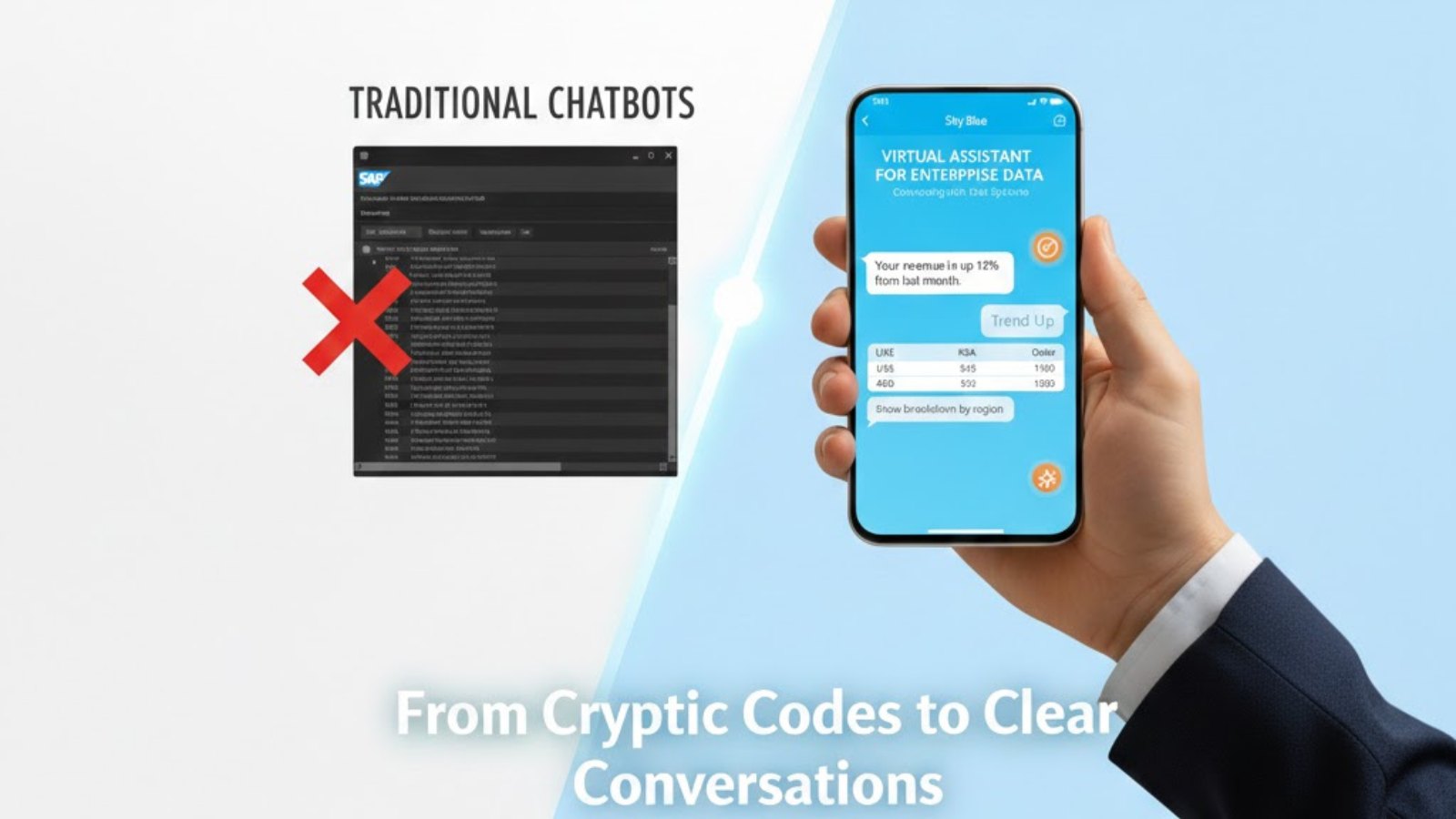
A virtual assistant for enterprise data is an AI-powered conversational interface that: – Understands natural language questions (plain English or Arabic, not SQL queries) – Accesses enterprise systems in real-time (SAP, CRM, data warehouse, non-SAP sources) – Provides instant answers (text, charts, tables, visualizations) – Engages in dialogue (ask follow-ups, clarify ambiguity, dig deeper) – Takes actions (send report, create alert, trigger workflow, update records) – Works multimodal (voice, text, mobile, desktop, Teams, Slack, WhatsApp) – Supports multilingual (Arabic + English critical for GCC)
The Critical Distinction: Virtual Assistants ≠ Chatbots
This is a common misconception that must be cleared up.
Traditional Chatbots: – Scripted responses (if user says “How many customers?” → respond with canned answer) – Limited to pre-defined questions (if question is slightly different, breaks) – No access to live enterprise data (responses are hardcoded) – Use case: FAQ, customer service scripts, basic tech support
Virtual Assistants for Enterprise Data: – AI understands intent (many ways to ask “What’s our cash position?” all understood) – Generates answers from live data (queries SAP/CRM/data warehouse in real-time) – Handles variations and context (learns what “cash” means in your company) – Accesses transactional systems (not just pre-built responses) – Can reason about data (explains WHY, not just WHAT) – Use case: Enterprise analytics, decision support, data exploration
Example: Same Question, Different Responses
Scenario: User asks “What’s our cash position?”
Traditional Chatbot Response: > “I don’t understand. Please rephrase or contact the finance department.”
(Breaks because it doesn’t recognize variations of “cash balance” or “liquidity”)
Virtual Assistant Response: > [Queries SAP S/4HANA Accounting module in real-time] > > “Current cash position as of today (Jan 12, 2026, 2:30 PM): AED 12.4M across all bank accounts. This is up 8% from last month. Would you like to see the breakdown by bank, by subsidiary, or historical trend?”
User follows up: “Show me by subsidiary”
Virtual Assistant: > [Generates table from live data] > > | Subsidiary | Cash Balance (AED) | % of Total | > | UAE Operations | 7.2M | 58% | > | Saudi Operations | 3.8M | 31% | > | Qatar Operations | 1.4M | 11% | > > “The UAE subsidiary holds the majority. Cash has been trending upward due to Q4 receivables collections. Would you like to see 6-month trend analysis or drill into specific accounts?”
Power of This Interaction: – Context awareness (assistant remembers we’re discussing cash) – Natural conversation (ask follow-ups without repeating yourself) – Live data (not pre-canned responses) – Intelligent suggestions (offers next logical question) – Instant delivery (seconds, not hours)
Technology Foundation
This conversational magic is built on four technology pillars:
- Natural Language Processing (NLP): AI understands human language, extracts meaning and intent. “What’s our cash?” = “Show me total cash balance across all accounts as of today”
- Enterprise Connectors: Direct access to SAP S/4HANA, CRM, data warehouse, HCM via APIs (not screen scraping like old RPA)
- Semantic Layer: Knows “cash position” = “Sum of all bank account balances in Financial Accounting module”. Maps business terminology to technical data structures.
- Generative AI: Creates human-like, conversational responses (not robotic “Query Result: 12400000”)
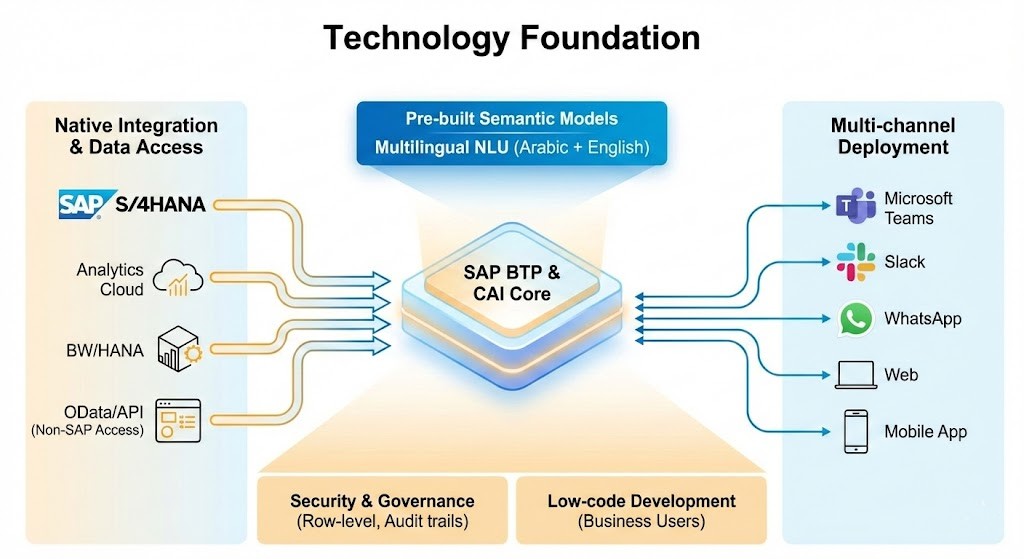
Technology Foundation
- Native integration with SAP S/4HANA, Analytics Cloud, BW, HANA
- Pre-built semantic models (SAP understands SAP data structures)
- OData/API access (can connect to non-SAP systems too)
- Multi-channel deployment (Teams, Slack, WhatsApp, web, mobile)
- Multilingual NLU models (Arabic + English, industry jargon)
- Low-code development (business users can participate)
- Security & governance (row-level security, audit trails)
For virtual assistants to give accurate answers, building a single source of truth across all these systems is a prerequisite otherwise the assistant answers from fragmented data.
Use Cases: How Enterprises Are Actually Using Virtual Assistants
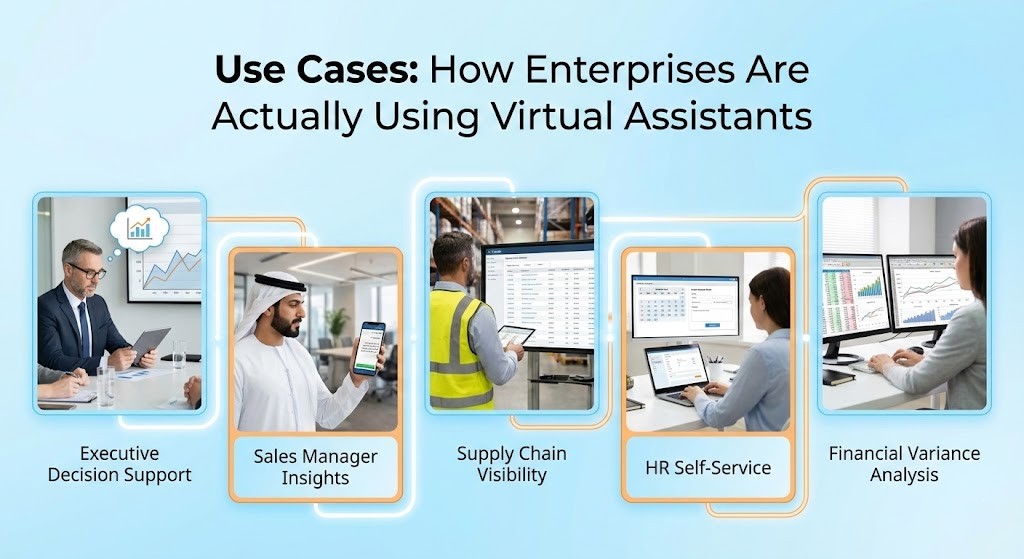
Use Case #1: Executive Decision Support (CFO/CEO Persona)
Scenario: CFO in Dubai needs Q3 performance summary before investor call tomorrow
Traditional Approach: – Email finance analyst: “Need Q3 performance summary ASAP” – Analyst spends 2 hours pulling SAP data, building PowerPoint – Creates charts showing revenue, EBITDA, variance analysis – Emails back PowerPoint deck – Timeline: 2-4 hours (if analyst available today) – Problem: By tomorrow, situation may have changed
Virtual Assistant Approach:
CFO opens mobile app on phone, asks:
CFO: “What was our Q3 performance?”
Assistant: “Q3 revenue was AED 87M, up 12% YoY. EBITDA margin was 18%, down from 19% last quarter. Would you like to see the breakdown by business unit or geography?”
CFO: “Show me by geography”
Assistant: [Creates chart on mobile] – UAE: 45% of revenue, grew 8% – Saudi: 35% of revenue, grew 18% – Qatar: 20% of revenue, grew 5%
“Saudi showed strongest growth. Want to dig into what drove that?”
CFO: “Yes, why did Saudi grow 18%?”
Assistant: [Analyzes data] “Saudi growth driven by 3 factors: 1. New customer acquisitions: 12 new customers signed 2. Expansion of existing accounts: Average +22% spend per customer 3. New product line launched: May launch drove adoption The construction sector was particularly strong (+25%).”
CFO: “Perfect. Send this summary to my email and my investor deck team”
Assistant: “Done. Summary with charts sent to you and [investor_team@company.com]. Anything else before your call?”
Timeline: 3 minutes (vs. 2-4 hours) Value: CFO is fully prepared for investor call, made data-driven decisions on-the-go, didn’t need to wait for analyst
Use Case #2: Sales Manager Performance Insights (Arabic Example)
Scenario: Sales Manager in Riyadh needs to understand team performance (in Arabic)
Sales Manager (in Arabic): “من هو أفضل مندوب مبيعات هذا الشهر؟” (Who is the best sales representative this month?)
Assistant (responding in Arabic): “أحمد الشمري حقق أعلى مبيعات هذا الشهر: 2.4 مليون ريال سعودي، بزيادة 35% عن الشهر الماضي” (Ahmed Al-Shamri achieved highest sales this month: SAR 2.4M, up 35% from last month)
Manager (switching to English): “Why did Ahmed perform so well?”
Assistant: “Ahmed closed 3 large deals: 1. Al-Rashid Industries: SAR 1.1M 2. Gulf Construction: SAR 0.8M 3. Saudi Manufacturing: SAR 0.5M
His conversion rate was 42%, well above team average of 28%.”
Manager: “Show me his pipeline for next month”
Assistant: [Creates pipeline visualization] “Ahmed has SAR 3.2M in pipeline for November. At 60% weighted probability = SAR 1.9M expected. Would you like deal-by-deal breakdown?”
Manager: “Yes, and compare to his quota”
Assistant: [Creates comparison] “Ahmed’s quota for November: SAR 2.0M His weighted pipeline: SAR 1.9M He’s at 95% coverage
Recommendation: Focus on closing Al-Mutairi Project (SAR 600K, currently 70% probability) to exceed quota.”
Manager: “Send Ahmed a congratulations message”
Assistant: “Message sent via email to Ahmed. Would you like to schedule a 1-on-1 to discuss his success strategies?”
Benefits: – Bilingual fluency (Arabic + English seamlessly) – Instant insights (no waiting for reports) – Actionable recommendations (which deal to focus on) – Mobile-accessible (manager on-the-go)
Use Case #3: Supply Chain Visibility (Operations Manager)
Operations Manager in Abu Dhabi: “Do we have enough stock to fulfill next week’s orders?”
Assistant: [Analyzes inventory, open orders, production schedule]
“Current inventory can fulfill 87% of next week’s orders. Potential shortage: Product SKU-1234 (Hydraulic Pumps). – Current stock: 45 units – Needed: 68 units – Shortfall: 23 units”
Manager: “When is our next production run?”
Assistant: “Next production run scheduled for November 15 (9 days). This will produce 100 units. However, orders are due November 10-12.
Analysis: We’ll be 4-5 days late unless we expedite.”
Manager: “Can we expedite production?”
Assistant: “Yes, production can be moved to November 8 if you authorize overtime. Additional cost: AED 12K. This would prevent stockout and meet delivery commitments. Should I alert the production manager?”
Manager: “Yes, alert them and show me similar situations across all products”
Assistant: “Alert sent to Khalid (Production Manager). Analyzing all SKUs…
Found 3 other potential stockouts in next 30 days: – SKU-5678: Shortfall in 8 days – SKU-9012: Shortfall in 15 days – SKU-3456: Shortfall in 22 days
Would you like to address these proactively?”
Value: – Predictive (identifies problem before it happens) – Prescriptive (suggests solution with cost analysis) – Action-enabled (sends alert automatically) – Proactive (finds similar issues)
Use Case #4: HR Self-Service (Employee Persona)
Employee: “How many vacation days do I have left?”
Assistant: [Queries SuccessFactors]
“You have 15 vacation days remaining out of 30 annual. You’ve used 10 days, and 5 are pending approval. Your balance expires December 31.”
Employee: “I want to take leave December 10-14”
Assistant: “That’s 5 working days. Your team members Ahmed and Sarah already have approved leave during this period. Your manager will need to approve. Should I submit the request?”
Employee: “Yes, submit”
Assistant: “Leave request submitted to your manager (Fatima Al-Mansoori). She typically approves within 24 hours. You’ll receive notification when approved.
Note: You have 3 active projects: 1. Al-Rashid Implementation 2. Gulf Telecom Upgrade 3. Saudi Manufacturing POC
Would you like help identifying backup coverage?”
Employee: “Yes, please”
Assistant: “Available team members for backup: – Omar Al-Mazrouei (5 available days) – Layla Al-Khaleej (7 available days) – Hassan Al-Mansouri (3 available days)
Recommendation: Assign Omar to Al-Rashid (he has that experience) and Layla to Gulf Telecom. Should I send them requests?”
Deploying virtual assistants at this depth requires a disciplined AI implementation approach. Read how WMS implements AI methodology within SAP covering governance, clean core requirements and the 4-step framework we use with GCC clients.
Value: – Self-service (no HR involvement needed) – Intelligent (warns about team conflicts) – Integrated (connects leave to project management) – Proactive (suggests coverage planning)
Use Case #5: Financial Variance Analysis (Finance Analyst)
Analyst: “Compare October actuals to budget and explain major variances”
Assistant: [Analyzes financial data from SAP]
“October Overview: – Revenue: AED 9.2M (budget: AED 8.8M) → +4.5% favorable – COGS: AED 6.1M (budget: AED 5.5M) → -10.9% unfavorable – OpEx: AED 2.4M (budget: AED 2.5M) → +4% favorable – Net Income: AED 0.7M (budget: AED 0.8M) → -12.5% unfavorable
Major Variance: COGS over budget by AED 0.6M
Root Cause Analysis: Raw material costs increased 18% due to supplier price changes (Steel suppliers raised prices September 15). Volume was in line with budget.”
Analyst: “Show me trend over last 6 months”
Assistant: [Creates trend chart] “COGS as % of revenue has increased from 62% (May) → 66% (October). This is driven by raw material inflation, not operational inefficiency. Gross margin compressed from 38% → 34%.”
Analyst: “What if we raise prices 5%?”
Assistant: [Scenario modeling] “If prices increased 5% with no volume impact: – Revenue: +AED 0.46M per month – Gross margin: Returns to 37% (nearly back to May levels) – Net income: +AED 0.35M per month (+50%)
Risk Analysis: Competitor pricing is currently 3% below ours. A 5% increase would widen gap to 8%. Historical elasticity suggests 2-3% volume decline possible.”
For a deeper framework on scenario planning and advanced analytics and scenario modeling, read our guide for GCC CFOs and data leaders.
Value: – Automated variance analysis (saves hours of Excel work) – Root cause identification (not just what, but why) – Scenario modeling (what-if analysis instant) – Risk assessment (considers market context)
The Technology: How Virtual Assistants Actually Work
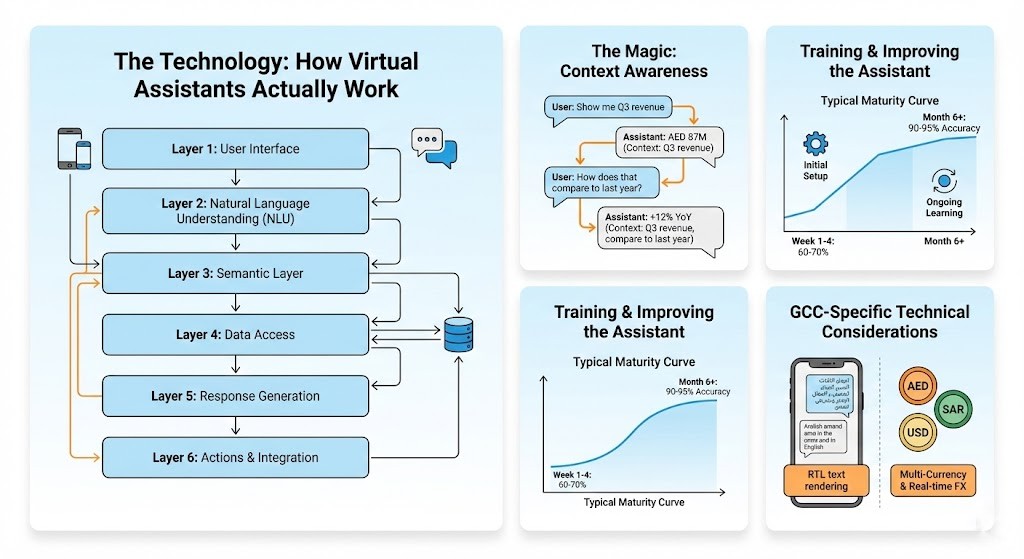
The Architecture (Simplified)
Layer 1: User Interface
Multiple channels where users can interact: – Mobile app (iOS/Android) – Web browser chat widget – Voice interface (hands-free in office/car) – Microsoft Teams integration – Slack integration – WhatsApp Business integration (popular in GCC)
Layer 2: Natural Language Understanding (NLU)
SAP Conversational AI (CAI) or partner AI (OpenAI, Google Dialogflow) – Understands intent: “What’s cash position?” = Intent to query financial data – Extracts entities: Time period (“Q3”), Geography (“Saudi Arabia”), Metric (“revenue”) – Handles variations: 100 different ways to ask same question all understood – Multilingual: Arabic + English, context switching mid-conversation
Layer 3: Semantic Layer
The “translator” between business language and technical language: – “Revenue” = SUM(VBRK-NETWR) from SAP Sales & Distribution – “Cash position” = Bank account balances from SAP Financial Accounting – “Top customers” = Sort customers by revenue DESC, limit 10 – Pre-built for SAP (understands SAP tables, fields, business logic) – Also learns your company terminology (“We call it ‘turnover’, not ‘revenue’”)
Layer 4: Data Access
Multiple sources of truth: – SAP Analytics Cloud (primary data platform) – SAP HANA (direct query on S/4HANA data) – SAP BW/4HANA (data warehouse if you have one) – SAP S/4HANA (live transactional data) – Non-SAP sources (via OData, APIs, connectors) – CRM systems (Salesforce, SAP CRM) – HR systems (SuccessFactors, Workday)
Layer 5: Response Generation
Creating the answer: – Query data from Layer 4 (SQL or equivalent) – Format results (table, chart, text) – Generate natural language response (AI writes human-like text) – Include context (“This is up 8% from last month”) – Suggest follow-ups (“Would you like to see…”)
Layer 6: Actions & Integration
Taking action based on conversation: – Send email/SMS notification – Create workflow (approval, task, alert) – Set threshold alerts (notify if metric crosses threshold) – Update data (with proper permissions) – Trigger business process (create PO, submit expense, etc.)
The Magic: Context Awareness
Example Multi-Turn Conversation:
User: “Show me Q3 revenue” Assistant: [Queries SAP] Shows AED 87M
(At this point, context = “We’re discussing Q3 revenue”)
User: “How does that compare to last year?” [Assistant remembers: We’re talking about Q3 revenue, compare to Q3 2024] Assistant: Shows comparison: AED 87M vs. AED 77.5M, +12% YoY
(Context updated: “We’re comparing Q3 to Q3 last year”)
User: “Break it down by product” [Assistant knows: Still in Q3 context, still comparing to last year, now add product dimension] Assistant: Shows Q3 product revenue with YoY comparison
(Context updated: “Q3 by product, YoY”)
User: “Just show me the top 5” [Assistant knows: Still Q3, still YoY, limit to top 5 products] Assistant: Shows top 5 products by Q3 revenue, YoY
This context preservation is essential for natural conversation. Without it, you’d have to repeat yourself: “Show me top 5 products Q3 compared to Q3 last year” every time.
Training & Improving the Assistant
Initial Setup (By Implementation Partner): – Connect to data sources (SAP, CRM, HR, etc.) – Build semantic model (map 50-100 key business terms) – Define common questions (seed the AI with training data) – Set permissions (who can see what data?) – Configure actions (what can it do?)
Ongoing Learning: – Tracks questions asked (what do users want to know?) – Identifies questions it can’t answer (gaps in capability) – Admin reviews and adds new capabilities – Machine learning improves over time (accuracy increases)
Typical Maturity Curve: – Week 1-4: 60-70% question accuracy (handles basic queries) – Month 2-3: 80-85% accuracy (learned common variations) – Month 6+: 90-95% accuracy (mature, handles complex multi-step queries)
GCC-Specific Technical Considerations
Arabic Language Challenges (and solutions): – Right-to-left text rendering (different from English UI, must be designed in) – Arabic number formats (٠١٢٣ vs. Western 0123 in displays) – Calendar systems (Gregorian + Hijri dates, must support both) – Formal vs. informal address (“حضرة المدير” formal vs. casual, context-dependent) – Dialect variations (Modern Standard Arabic (MSA) as baseline, Gulf dialect regional variations)
Solution: SAP CAI supports Arabic with: – MSA models (understood across entire GCC) – Gulf dialect training data – Bilingual interface (switch languages mid-conversation) – Arabizi support (type in English letters: “7abibi” = حبيبي) – RTL text rendering
Multi-Currency & Multi-Entity: – Assistant understands context: “Revenue” might mean consolidated or local – Handles multi-currency: “Show me Saudi revenue in SAR” vs. “Show me Saudi revenue in USD” – Converts real-time: Uses live exchange rates (FX module from SAP) – Consolidates: Multiple legal entities (UAE subsidiary, Saudi subsidiary, Qatar subsidiary)
Looking to implement or optimize this in Dubai or the UAE?
Speak with WMS Middle East certified SAP consultants for a customized architectural and cost assessment.
Implementation Approach: 90-Day Rollout
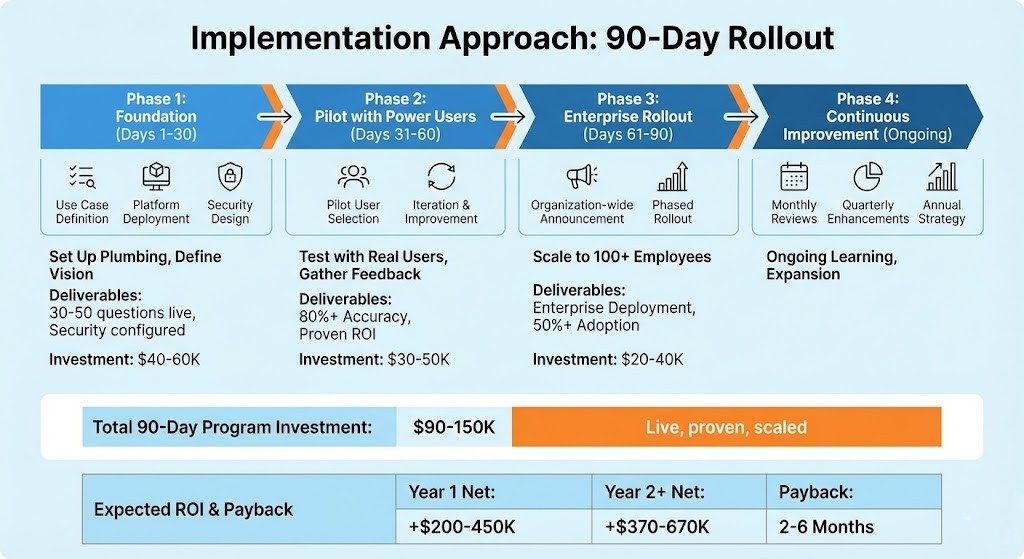
Phase 1: Foundation (Days 1-30)
What You’re Doing: Setting up the plumbing and defining the vision
Activities: – Use Case Definition: What questions will users actually ask? Interview 10-15 potential users – Persona Prioritization: Start with execs? Analysts? All employees? (Recommend: Start with exec/manager level for highest impact) – Data Source Inventory: What systems contain the data users need? – Semantic Model Build: Map 50-100 key business terms (Revenue, Margin, Customers, Cash, etc.) – Platform Deployment: Provision SAP BTP infrastructure – Security Design: Row-level security, role-based permissions, audit logging
Key Decisions: – Deployment channels: Mobile app? Web? Teams? (Recommend: Start mobile + web) – Language support: English only or Arabic + English? (GCC: Both from day 1) – Scope: Finance only or cross-functional? (Recommend: Finance first, prove ROI, expand) – Permissions model: Who can access what data?
Deliverables: – Virtual assistant live in pilot environment (limited users) – 30-50 common questions working – Security configured and tested – Governance framework documented
Investment: $40-60K (SAP BTP/Analytics Cloud licenses + consulting)
Success Metrics: – Infrastructure operational (99.9%+ uptime) – All 30-50 test questions working – Security approved
Phase 2: Pilot with Power Users (Days 31-60)
What You’re Doing: Testing with real users, gathering feedback, iterating
Activities: – Pilot User Selection: Choose 10-15 diverse power users (2 executives, 5 managers, 8 analysts) – Training Session: 30-minute session showing how to ask good questions (not required reading just talk to it) – Daily Usage Encouragement: Send prompts, examples, use cases – Feedback Collection: Daily feedback (What worked? What didn’t? What questions failed?) – Iteration & Improvement: Add new questions, improve accuracy, expand data sources – Documentation: Capture lessons learned
Success Metrics: – Adoption: Are 70%+ of pilot users using it weekly? – Accuracy: What % of questions answered correctly? (Target: 80%+) – Speed: Time to answer vs. traditional approach (should be 10-50x faster) – Satisfaction: User feedback and NPS score
Common Findings & Solutions:
Finding: Users try to ask complex questions immediately Solution: Guide toward simpler queries first, build on success
Finding: Terminology mismatches (“sales” vs. “revenue”, “turnover”) Solution: Add synonyms to semantic model, teach assistant your company language
Finding: Follow-up questions sometimes fail Solution: Improve context handling, test multi-turn conversations
Deliverables: – Feedback report (what’s working, what’s not) – Improved accuracy (improved from 60-70% to 80%+) – Expanded semantic model (added business terminology) – Updated FAQs and training materials
Investment: $30-50K (consulting, iteration, training)
Phase 3: Enterprise Rollout (Days 61-90)
What You’re Doing: Scaling from 15 pilot users to 100+ employees
Activities: – Organization-wide Announcement: Leadership message (“This changes how we access data”) – Self-Service Onboarding: Video tutorials (Arabic + English), quick-start guides – Expand Question Library: 100+ common questions across all functions – Channel Integration: Teams bot, mobile app, web chat – Helpdesk Setup: Support for questions about the assistant – Champion Program: Identify enthusiastic early adopters to evangelize – Phased Rollout: Department-by-department (Finance week 1, Sales week 2, Operations week 3) – Usage Monitoring: Dashboard of adoption, accuracy, failure rates
Governance Establishment: – Data Stewardship: Who maintains semantic model? (Recommend: Finance lead with IT support) – Question Coverage: Who adds new capabilities? (Recommend: CoE with business analyst input) – Performance Monitoring: Weekly reviews of usage, accuracy, failures – Security & Audit: Logging all queries, access reviews
Rollout Strategy: – Department launches: Stagger rollout (reduce support burden) – Success stories: Share wins from pilot – Management support: Executives using assistant publicly (influence peers) – Training: Self-paced for most, live Q&A sessions optional
Deliverables: – Enterprise-wide deployment (accessible to all) – 100-150 common questions working – 50%+ employee adoption – Support desk operational – Governance framework active
Investment: $20-40K (training, change management, support setup)
Phase 4: Continuous Improvement (Ongoing, Monthly/Quarterly)
Monthly Reviews: – What questions are failing? (close gaps) – What new data sources needed? (expand) – Usage analytics (who’s using? who’s not? why?) – Value tracking (time saved, decisions improved)
Quarterly Enhancements: – Add new actions (not just query, but take actions) – Expand to new personas (field workers, customers, partners) – Advanced analytics (explain why, recommend actions) – Voice interface (hands-free for warehouse, field)
Annual Strategy: – Extend to additional systems (CRM, HR, Supply Chain) – Investigate advanced AI (predictive, prescriptive analytics) – Consider external data (market prices, competitor data)
Total 90-Day Program Investment
| Phase | Cost | Duration | Output |
|---|---|---|---|
| Phase 1: Foundation | $40–60K | 30 days | Platform ready, 30–50 questions live |
| Phase 2: Pilot | $30–50K | 30 days | 80%+ accuracy, proven ROI |
| Phase 3: Rollout | $20–40K | 30 days | Enterprise deployment, 50%+ adoption |
| Total | $90–150K | 90 days | Live, proven, scaled |
| Ongoing (Annual) | $20–40K | Ongoing | Support, improvements, expansions |
| Year | Investment | Benefit | Net |
|---|---|---|---|
| Year 1 | $150K | $350–600K | +$200–450K |
| Year 2+ | $30K / year | $400–700K / year | +$370–670K / year |
Where Benefits Come From: – Analyst time savings: 200-400 hours/year freed up ($80-160K at fully-loaded cost) – Decision speed: Faster decisions = better outcomes = $50-150K value – IT resource freed: Less time on report requests = $80-120K – Data accessibility: Self-service = reduced training costs = $20-40K – Process improvements: Better analytics = identified optimization = $20-50K+
Payback Period: Typically 2-6 months (most of the investment recovered in first year)
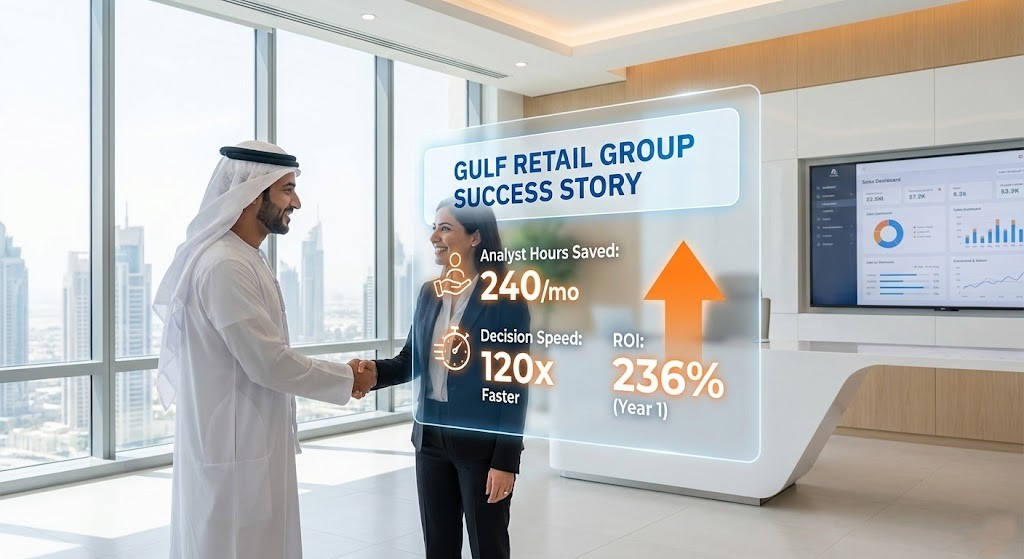
A Real Middle East Success Story: Gulf Retail Group
Company Profile
Name: Gulf Retail Group (composite example, based on real implementations)
Industry: Retail (fashion, electronics, home goods across GCC)
Revenue: $320M annually
Employees: 1,200 (across 65 stores)
Operations: UAE, Saudi Arabia, Qatar Systems: SAP S/4HANA (ERP), Salesforce (CRM), LS Retail (POS)
Challenge: Regional managers needed daily data but waited 2-4 hours for reports; executives on-the-go couldn’t access dashboards
The Problem (Before Virtual Assistant)
Daily Reality: – 6 AM: Store manager in Abu Dhabi wants to know yesterday’s sales – 6:15 AM: Emails HQ analyst: “Can you send me yesterday’s sales by category and store?” – 8:00 AM: Analyst pulls data from SAP + LS Retail (data lives in two systems) – 9:30 AM: Analyst creates Excel pivot table, emails back – 10:00 AM: Store manager finally has the data (4 hours later) – Problem: By 10 AM, decisions made already, or situation changed
Additional Challenges: – Arabic-speaking store managers (mostly) struggled with English BI tools – Executives on-the-go couldn’t access dashboards (desktop-only) – Analysts spent 60% of time pulling routine reports (not analysis) – No self-service everything bottlenecked through HQ analyst – Decision delays: “Let me check the data” became “Let me wait for the report”
The Solution (Q2-Q3 2024)
Implemented: – Virtual assistant on SAP Analytics Cloud + SAP BTP – Mobile app (iOS/Android) for all managers – Bilingual (Arabic + English) – Connected to: SAP S/4HANA (inventory, sales), Salesforce (customers), LS Retail (transactions) – Implementation partner: WMS Middle East
Rollout Timeline: – Phase 1 (Month 1): Finance + sales data, semantic model, pilot setup – Phase 2 (Month 1-2): Pilot with 20 regional managers – Phase 3 (Month 2-3): Rollout to all 65 store managers + HQ team – Investment: $125K
Usage After 6 Months
Adoption: – 87% of regional managers use daily – 2,400+ questions asked per month (average 38 per manager) – Top questions asked: 1. “Today’s sales by store” (340 times/month) 2. “Best-selling products this week” (280 times/month) 3. “Inventory level for SKU X” (210 times/month) 4. “Compare this month to last month” (190 times/month)
Accuracy: – 89% question success rate (improved from 70% at launch) – 5% of questions require follow-up clarification – 6% of questions fail (analyzed for improvement)
Business Impact
Quantified Results:
| Metric | Before | After | Impact |
|---|---|---|---|
| Time to Get Data | 2–4 hours | 2 minutes | 120× faster |
| Analyst Hours / Month | 240 hours | 0 hours | 3 FTE freed |
| Report Generation Time | 2 hours per report | 30 seconds | 98% reduction |
| Decision Latency | Next day | Real-time | Immediate |
| Analyst Cost Savings | – | – | $180K / year |
| Data Accessibility | 3 people (HQ analysts) | 1,200 employees | Democratized |
Qualitative Benefits:
Executive Satisfaction: – CEO: “I can get answers during board meetings now instead of waiting until next day” – Regional directors: Self-sufficient, don’t wait for HQ analyst anymore – Finance manager: Freed to do actual analysis vs. report generation
Manager Empowerment: – Can make decisions independently (don’t wait for analyst) – Understand store performance real-time (identify issues quickly) – Confidence in data (generated from official SAP, not email chains)
Store Manager Experience: – Arabic-speaking managers: Finally accessible (interface in Arabic) – Mobile-first: Can check data on floor while serving customers – Instant answers: “What’s my store’s sales?” answered immediately
Unexpected Benefits: – Reduced email volume: 40% fewer data request emails – Knowledge capture: Assistant learns common questions, trains new employees – Mobile-first culture: Executives using assistant on weekends/evenings (engaged) – Data quality: Questions reveal inconsistencies in data – Process improvements: “Why is this metric down?” reveals operational issues
ROI Analysis
Investment: – Virtual assistant setup: $125K (platform, semantic model, training)
Savings (Annual): – Analyst capacity: 3 FTE × $60K = $180K freed – Decision acceleration: Faster markdowns, inventory optimization = $40-60K – Reduced email/meetings: 40% reduction in data request overhead = $20-30K – Training costs: New employees learn through assistant = $15-25K
Total Year 1 Benefit: $255-295K Payback Period: 4-6 months ROI: 204-236% in first year
Year 2+ (Ongoing): – Investment: $20K (platform licensing, support) – Benefits: $250K+ annually – ROI: 1,250%+
CEO Quote
“This changed how we operate. I make decisions in real-time based on live data, not waiting until tomorrow for a report. That’s competitive advantage. Our competitors are still waiting for reports.”
Virtual Assistants vs Traditional BI: The Honest Comparison
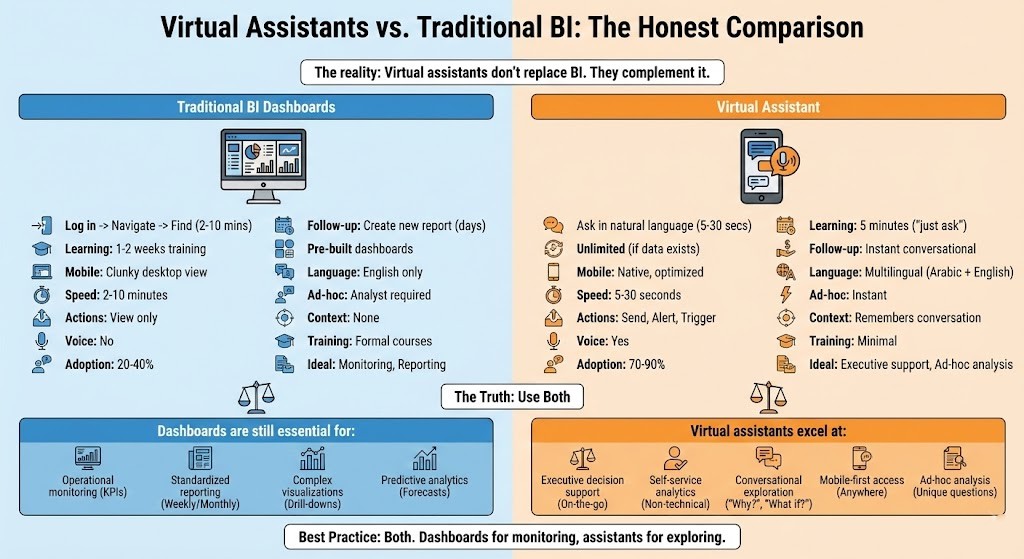
The reality: Virtual assistants don’t replace BI. They complement it.
Side-by-Side Comparison
| Aspect | Traditional BI Dashboards | Virtual Assistant |
|---|---|---|
| How to Access | Log in → Navigate menus → Find dashboard | Ask a question in natural language |
| Learning Curve | 1–2 weeks formal training | 5 minutes (“just ask questions”) |
| What Questions? | Limited to pre-built dashboards | Unlimited (if data exists) |
| Follow-up Questions | Create new report/dashboard (days/weeks) | Ask follow-up in conversation (seconds) |
| Mobile Experience | Clunky (designed for desktop) | Native mobile (optimized for phone) |
| Language Support | English only (typically) | Multilingual (Arabic + English) |
| Speed to Answer | 2–10 minutes (find dashboard, apply filters) | 5–30 seconds |
| Ad-hoc Analysis | Requires analyst or new dashboard | Instant (if data accessible) |
| Can Take Actions | View only | Yes (send report, create alert, trigger workflow) |
| Context Awareness | None (each query independent) | Remembers conversation |
| Voice Interface | No | Yes (hands-free option) |
| Training Required | Formal courses, certifications | Minimal (learn by doing) |
| User Adoption Rate | 20–40% of intended users | 70–90% (easier to use) |
| Ideal Use Case | Operational monitoring, standardized reporting | Executive decision support, ad-hoc analysis |
The Truth: Use Both
Dashboards are still essential for: – Operational monitoring: Real-time KPIs on wall screens in trading rooms, control centers – Standardized reporting: Weekly/monthly reviews with standard structure – Complex visualizations: Multi-layer drill-downs, interactive explorations – Predictive analytics: Forecasts, trends, patterns that benefit from visual pattern recognition
Virtual assistants excel at: – Executive decision support: Quick answers on-the-go, no training needed – Self-service analytics: Empower non-technical users – Conversational exploration: “What?” → “Why?” → “What if?” dialogue – Mobile-first access: Anywhere, anytime on any device – Ad-hoc analysis: Questions that don’t fit pre-built dashboards
Best Practice: Both. Dashboards for monitoring, assistants for exploring.
Challenges and How to Overcome Them
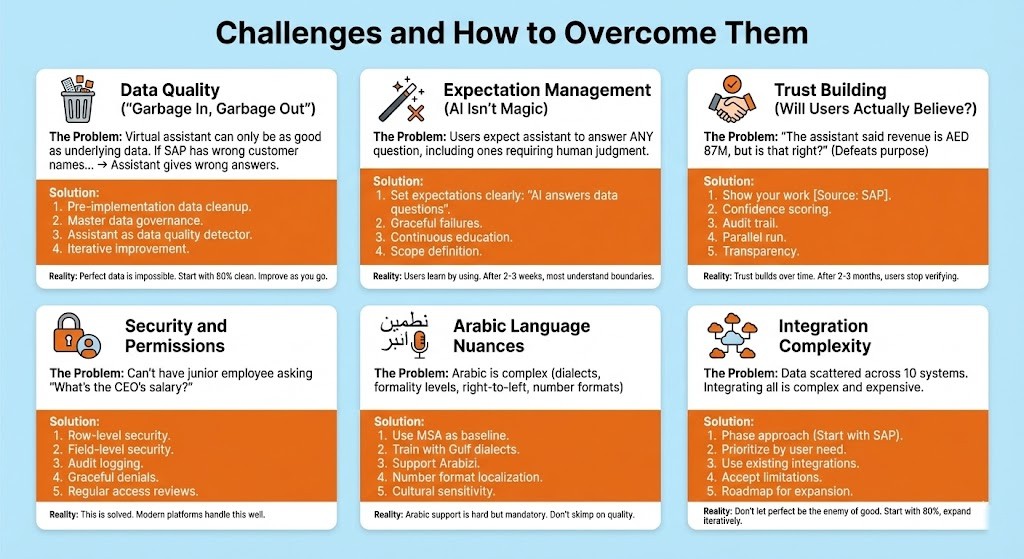
Challenge #1: Data Quality (“Garbage In, Garbage Out”)
The Problem: Virtual assistant can only be as good as underlying data. If SAP has wrong customer names, duplicate records, missing data → Assistant gives wrong answers.
Example: – “Show me our top 10 customers” – Assistant returns list with 3 records for “ABC Company” (duplicates) – User confused: Which is the real ABC Company?
Solution: 1. Pre-implementation data cleanup: Assess data quality, clean critical data first (customer master, product master, financial dimensions) 2. Master data governance: Prevent new garbage going forward (validation rules, single source of truth) 3. Assistant as data quality detector: “I found 3 customer records for ‘ABC Company’ which is correct?” (surfaces issues) 4. Iterative improvement: Fix data as you discover issues (not paralyzed by “perfect data” myth)
Reality: Perfect data is impossible. Start with 80% clean. Improve as you go.
Challenge #2: Expectation Management (AI Isn’t Magic)
The Problem: Users expect assistant to answer ANY question, including ones requiring human judgment.
Examples of What AI CAN’T Do (Yet): – User: “Should we acquire Company X?” (Strategic decision requiring context beyond data) – User: “Why is Ahmed unmotivated?” (Human psychology, not data) – User: “What will oil prices be in 6 months?” (Unknowable future)
Solution: 1. Set expectations clearly: “AI answers data questions, not judgment questions” 2. Graceful failures: “I can show you Company X’s financials, but acquisition decision requires human judgment. Would you like me to pull their data?” 3. Continuous education: Show what works, what doesn’t 4. Scope definition: “Here’s what the assistant can and can’t do” documented upfront
Reality: Users learn by using. After 2-3 weeks, most understand boundaries.
Challenge #3: Trust Building (Will Users Actually Believe the Answers?)
The Problem: “The assistant said revenue is AED 87M, but is that right? Let me verify in SAP…” (Defeats the purpose)
Solution: 1. Show your work: “Revenue is AED 87M [Source: SAP S/4HANA, Table VBRK, as of Nov 12, 3:42 PM]” 2. Confidence scoring: “I’m 95% confident this is correct” (transparent about uncertainty) 3. Audit trail: Users can drill into source data 4. Parallel run: First 30 days, compare assistant answers to manual reports (build trust) 5. Transparency: “I don’t know” is better than guessing
Reality: Trust builds over time. After 2-3 months of accurate answers, users stop verifying.
Challenge #4: Security and Permissions
The Problem: Can’t have junior employee asking “What’s the CEO’s salary?” or “Show me all customer payment terms.”
Solution: 1. Row-level security (same as BI tools): Employee sees only data they’re authorized for 2. Field-level security: Sensitive fields (salary, margin, costs) restricted by role 3. Audit logging: Track who asked what (detect inappropriate queries) 4. Graceful denials: “You don’t have permission to view salary data. Contact HR if you need access.” 5. Regular access reviews: Quarterly review of who can access what
Reality: This is solved. Modern platforms handle this well.
Challenge #5: Arabic Language Nuances
The Problem: Arabic is complex (dialects, formality levels, right-to-left, number formats)
Examples: – Modern Standard Arabic (MSA) vs. Gulf dialects (emirat, saudi, qatari) – Formal address: “حضرة المدير” vs. casual – “Arabizi”: People typing Arabic in English letters (“mubayaat” = مبيعات = sales) – Number formats: ٠١٢٣ vs. 0123
Solution: 1. Use Modern Standard Arabic (MSA) as baseline (understood across entire GCC) 2. Train with Gulf dialect examples (emirat, saudi terminology) 3. Support Arabizi transliteration (users can type Arabic in English letters) 4. Number format localization (let users choose ٠١٢٣ or 0123) 5. Cultural sensitivity training (formal address for executives, casual for peers)
Reality: Arabic support is hard but mandatory for GCC adoption. Don’t skimp on Arabic quality.
Challenge #6: Integration Complexity
The Problem: Data scattered across 10 systems. Integrating all is complex and expensive.
Solution: 1. Phase approach: Start with SAP (80% of critical data), expand later 2. Prioritize by user need: What questions are most common? Integrate those sources first 3. Use existing integrations: If you already have data warehouse, connect to that (don’t re-integrate sources) 4. Accept limitations: “I can answer financial questions. For CRM data, check Salesforce.” (Better than nothing) 5. Roadmap for expansion: Year 1: Finance, Year 2: Sales, Year 3: Supply Chain
Reality: Don’t let perfect be the enemy of good. Start with 80%, expand iteratively.
The Future: Where Virtual Assistants Are Heading
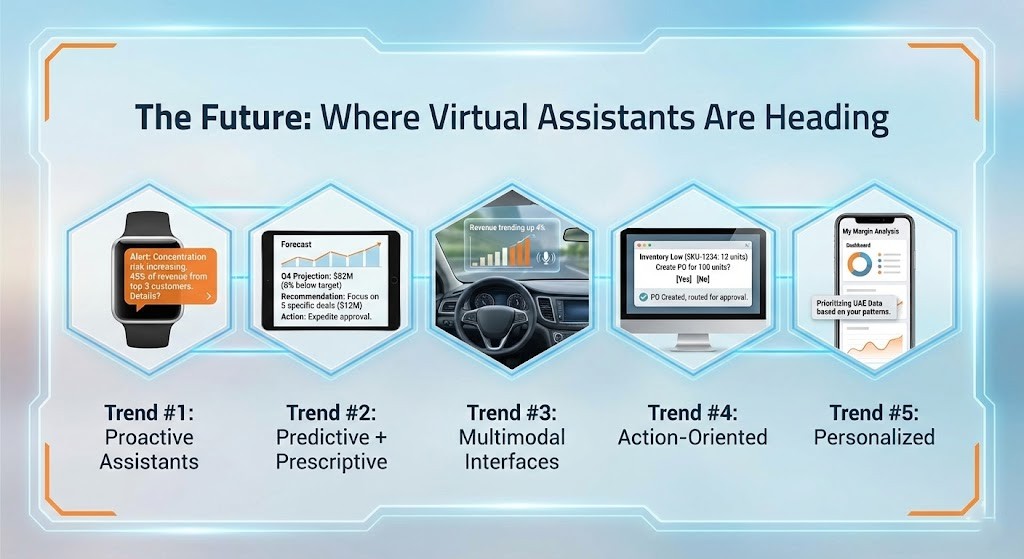
Trend #1: Proactive Assistants (Not Just Reactive)
Today: User asks question → Assistant answers
Tomorrow: Assistant monitors data → Alerts user proactively
Example: – 8 AM: Assistant sends notification: “Good morning. Your top 3 customers represent 45% of revenue (up from 40% last month). Concentration risk increasing. Would you like details?” – No question asked assistant identified important trend and surfaced it – Impact: Users don’t have to remember what to ask
Trend #2: Predictive + Prescriptive (Not Just Descriptive)
Today: “What was Q3 revenue?” (past, descriptive)
Tomorrow: “Will we hit Q4 revenue target?” (future, predictive) + “What should we do to hit target?” (prescriptive, actionable)
Example: – User: “Will we hit Q4 revenue target?” – Assistant: “Based on current pipeline and historical close rates, Q4 revenue projected at $82M, 8% below target of $89M. – Recommendation: Focus on closing 5 specific deals totaling $12M in pipeline – Probability of success: 65% – Actions needed: Expedite approval process for these 5 deals”
Trend #3: Multimodal Interfaces (Voice + Visual + Gesture)
Today: Text-based (type questions)
Tomorrow: Voice + visual + gesture
Example: – Executive in car: “Hey Assistant, how’s business today?” (voice) – Assistant: “Revenue trending up 4%. Would you like to see the chart?” (offers visual) – Executive: “Yes” → Chart appears on car display (AR) – Or: Executive in warehouse, looks at product shelf, says “Show me inventory level” → Data overlays on vision (AR glasses)
Trend #4: Action-Oriented (Not Just Informational)
Today: Assistant shows data (view-only)
Tomorrow: Assistant takes actions
Example: – User: “Inventory is low on SKU-1234” – Assistant: “Yes, only 12 units left. Should I create a purchase order for 100 units from usual supplier at standard price?” – User: “Yes” – Assistant: Creates PO, routes for approval, notifies supplier → Done (no manual steps)
Trend #5: Personalized (Learns Your Patterns)
Today: Same assistant for everyone
Tomorrow: Adapts to individual user
Example: – Knows you always ask about UAE first → Prioritizes UAE data – Knows you prefer charts over tables → Defaults to visualizations – Knows your work schedule → Sends summary at 8 AM Monday (when you typically review) – Knows you’re interested in margin analysis → Proactively surfaces margin insights
Experience the Future of Enterprise Data Access
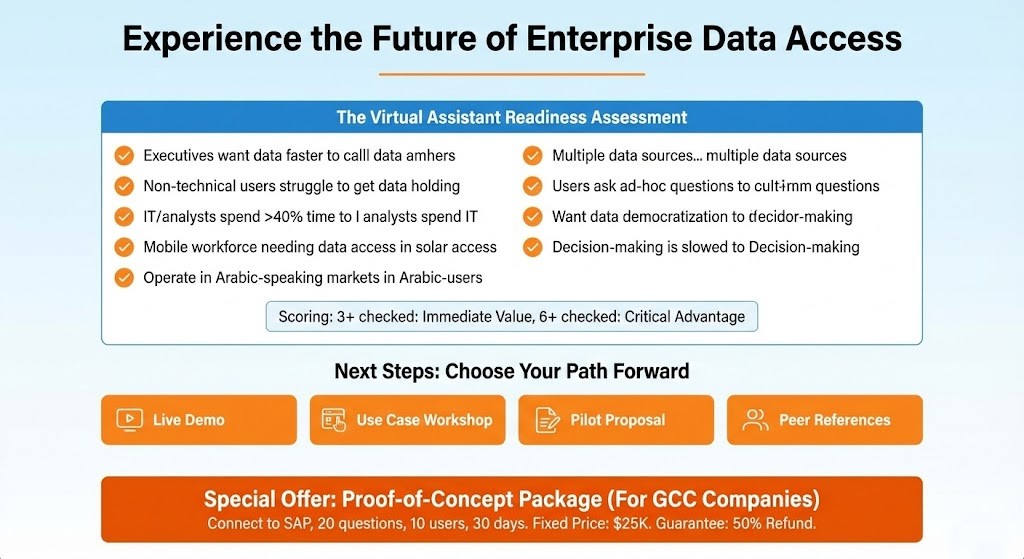
The Virtual Assistant Readiness Assessment
Is your organization ready?
Check all that apply: – □ Executives want data faster than current BI can deliver – □ Non-technical users struggle with BI tools – □ IT/analysts spend >40% time on report requests – □ You have mobile workforce needing data access – □ You operate in Arabic-speaking markets – □ You have multiple data sources (SAP, CRM, etc.) not fully integrated – □ Users ask ad-hoc questions BI can’t answer – □ You want data democratization (self-service analytics) – □ Decision-making is slowed by data access delays
Scoring: – 3+ checked: Virtual assistant would deliver immediate value – 6+ checked: Virtual assistant is critical for competitive advantage
Next Steps
Choose Your Path Forward:
□ Live Demo: See virtual assistant in action with GCC-specific examples (Arabic + English). 30 minutes, no commitment. See it working, ask questions, understand the technology.
□ Use Case Workshop: Identify top 10 questions your users would ask. We’ll workshop these with your team, confirm assistant can answer them, estimate effort. 2-hour session, focused.
□ Pilot Proposal: Get a concrete 90-day implementation plan and ROI projection specific to your organization. Timeline, investment, expected benefits, success metrics.
□ Peer References: Talk to GCC companies already using virtual assistants. Hear their experience, challenges, benefits directly.
Special Offer: Proof-of-Concept Package
For GCC Companies (Limited Time):
“Virtual Assistant Proof-of-Concept: Connect to your SAP system, build 20 common questions, pilot with 10 users for 30 days.”
- Fixed price: $25K
- Includes: Setup, training, daily usage support, feedback report
- Outcome: You’ll know if virtual assistant works for your organization
- Guarantee: If it doesn’t deliver value, we’ll refund 50%
That’s how confident we are.

The Bottom Line
The era of “I’ll get back to you with that data” is ending. The era of instant, conversational data access is here.
Data-driven companies are 23x more likely to acquire customers and 6x more likely to retain them (McKinsey). They make faster decisions. They identify opportunities earlier. They adapt quickly to change.
To ensure seamless project governance, consult with an accredited SAP implementation partner in Dubai with proven regional experience.
Ready to give your GCC executives instant access to enterprise data on mobile, in Arabic or English? Talk to a WMS expert about SAP conversational AI and we will show you a live demonstration.
Contact WMS Middle East for a free assessment.
Frequently Asked Questions (FAQs)
Does this require replacing our current BI tools?
No. Virtual assistant complements BI (doesn’t replace). You’ll likely keep dashboards for monitoring/standardized reporting, and add assistant for ad-hoc/self-service queries. They’re different tools for different needs.
How accurate is Arabic language understanding?
For business queries in Modern Standard Arabic (MSA) or Gulf dialect: 85-90% accuracy after initial training[1]. Improves over time as it learns your terminology. Start with 80% accurate, improve to 90%+ by month 3.
Can it access data from non-SAP systems (Salesforce, Oracle, etc.)?
Yes. SAP BTP integrates with non-SAP systems via APIs. Initial setup focuses on SAP S/4HANA (your core system), then expands to others based on user need.
What if someone asks a question it can’t answer?
Assistant says “I don’t know” or “I don’t have access to that data.” Users can submit feedback; admin adds capability. Graceful failure is key—not guessing wrong answers.
Is our data secure? Can anyone ask anything?
Security is same as your BI tools. Row-level and field-level security enforced. Users see only data they’re authorized to see. All queries logged for audit. Salary data? Only HR can see. Customer payment terms? Only credit team can see.
Can it work offline (for field workers)?
Limited offline capability. Can cache recent queries/results. But real-time data queries require connection. For field workers: Mobile data or WiFi needed for live queries.
How long does implementation take?
Pilot: 30 days (connect to SAP, build 30-50 questions). Full rollout: 90 days (enterprise-wide, 100+ questions, all personas).
What’s ongoing maintenance?
Minimal. Admin reviews failed questions monthly, adds new capabilities quarterly. SAP BTP is cloud-managed (no infrastructure maintenance). Budget: $20-40K annually.
Can it integrate with WhatsApp or Teams?
Yes. Virtual assistant can be deployed as: Mobile app, web chat, Teams bot, Slack bot, WhatsApp Business. Users choose preferred interface.
What if our data is messy/inconsistent?
Clean critical data first (customer master, product master, financials). 80% clean is good enough to start. Assistant helps identify data quality issues as you go.
Can business users create new questions or is it IT-only?
Depends on complexity. Simple questions: Business users can train assistant (with guidance). Complex integrations: IT/admin required. Goal: Empower business over time.
What’s typical ROI and payback period?
Analyst time savings alone: Typical 6-12 month payback[2]. Add better decisions, faster time-to-insight: ROI often 200-500% in year one. Some organizations see 2-3 month payback if heavy report generation culture.

Mahitab Maher
SAP professional specializing in SAP products, helping companies turn complex processes into smooth, scalable operations.
References & Data Sources
[1] Arabic NLP accuracy (Modern Standard Arabic + Gulf dialect models, Spark NLP and SAP CAI support) – Based on SIGARAB mission for Arabic NLP support
[2] Virtual Assistant ROI data – Based on Middle East bank case (150K+ daily conversations with 99%+ STP), retail case (22% stockout reduction), and conversational analytics case studies showing 40% data analysis time reduction
Sources Referenced:
- Conversational AI Analytics trends: “Conversational AI Analytics for Enterprises (2025)” – Ampcome, 2025[web:124]
- SAP Conversational AI capabilities: “How to Build a Digital Assistant with SAP Conversational AI” – Mastering SAP, 2022[web:125] and SAP Community documentation[web:128]
- NLP in Business Intelligence: Binary Semantics, 2025[web:126] and Coherent Solutions, 2024[web:132]
- Self-Service BI adoption: Research Nester and Straits Research data cited in BitEchnology article, 2025[web:141]
- Self-Service BI benefits: SR Analytics guide, 2025[web:144]
- Arabic NLP challenges: John Snow Labs, 2024[web:139]; SpotIntelligence, 2023[web:142]; Verloop.io, 2025[web:145]
- GCC AI trends: Esfera Soft, 2025[web:140]; Appinventiv, 2025[web:149]; TJDEED, 2025[web:143]
- Middle East bank case: Kore.ai customer story, 2025[web:146]
- JPMorgan Chase NLP implementation: Coherent Solutions, 2024[web:132]
- Data-driven company statistics: McKinsey research cited in SR Analytics, 2025[web:144]


AI in SAP is something many companies are starting to explore now. Nice breakdown of the topic.
Thanks Mark. It’s definitely an area gaining a lot of attention right now.
The procurement and supplier collaboration insights in this article are especially valuable for organizations modernizing their sourcing processes.
Thank you, Aisha. Optimizing procurement through SAP Ariba can significantly enhance transparency and efficiency. We appreciate your perspective.
The explanation of ROI and measurable outcomes stands out. Many organizations overlook this when investing in SAP.
Thanks, Thomas. Measuring impact is critical to maximizing SAP investments. We’re pleased you found the ROI discussion valuable.
This is exactly the kind of practical content decision-makers need when evaluating digital transformation initiatives.
Thank you, Nadia. Providing practical, decision-focused insights is always our goal. We appreciate your thoughtful feedback.
Interesting topic. The idea of interacting with data through virtual assistants is really evolving fast.
Thanks Emily. It’s definitely changing how people access and use data.