

Last Updated 28/08/2026
Executive Summary
- Strategic Overview: Comprehensive guidance on sap business one implementation: complete step-by-step guide for middle east smes tailored for Middle East and GCC enterprises.
- Key Advantage: Eliminates departmental silos, standardizes reporting, and accelerates operational agility.
- Next Step: Consult with certified WMS Middle East SAP experts for tailored architecture sizing and cost estimation.
Why Most SME ERP Implementations Fail Before They Even Begin
Last month, a Dubai-based trading company with 75 employees and AED 45 million in annual revenue made a decision that would determine their competitive future. After years of struggling with disconnected Excel spreadsheets, manual inventory tracking and countless hours reconciling data across five different systems, they committed to implementing SAP Business One.
Six months later, their story could have gone two ways. The first path: a rushed implementation with inadequate planning, resulting in confused staff, inaccurate data and a system that nobody trusts. The second path: a methodical, well-executed deployment that transformed their operations and delivered measurable results within the first quarter.
The difference? A clear understanding of what proper ERP implementation actually requires.
Who This Guide is For:
This implementation guide is specifically designed for:
By Role:
- CEOs and Managing Directors of growing SMEs
- Chief Financial Officers managing business transformation
- Finance Directors responsible for system selection
- Operations Managers dealing with process inefficiencies
- IT Managers tasked with technology deployment
By Company Profile:
- Small to medium enterprises (20-200 employees)
- Annual revenue between AED 20 million and AED 150 million
- Industries: Distribution and trading, manufacturing, retail, professional services and construction
- Operating in UAE, Saudi Arabia or Egypt
- Currently using QuickBooks, Excel or basic accounting software
- Experiencing growth challenges with existing systems
If your business is scaling rapidly, struggling with inventory visibility, facing cash flow management issues or preparing for regulatory compliance (UAE e-invoicing, ZATCA in Saudi Arabia), this guide will help you navigate your SAP Business One implementation successfully. This is the implementation guide the how and when of deploying SAP Business One. For the product overview (what SAP Business One is and its full feature set), read our SAP Business One complete guide.
Understanding Why Implementation Matters More Than Software Selection

Many SME leaders approach ERP adoption with a product-first mindset: “We need SAP Business One. Let’s buy it and install it.” This perspective fundamentally misunderstands what drives successful digital transformation.
The uncomfortable truth about ERP implementations:
Research across Middle East markets shows that 60-70% of ERP implementations at SMEs fail to deliver expected business value. Not because the software is inadequate SAP Business One is a robust, proven platform. They fail because organisations underestimate the complexity of implementation.
Common implementation failures we’ve observed:
Inadequate preparation: A Sharjah manufacturing company began their implementation without documenting current processes. Four months in, they discovered their production workflow required customisation they hadn’t budgeted for. The project stalled for eight months while they sorted out requirements that should have been identified in week one.
Underestimating change management: An Abu Dhabi distribution firm invested heavily in the technical deployment but allocated nothing for training. Three months after go-live, only 40% of staff were using the system correctly. Finance continued maintaining shadow Excel files because they didn’t trust the ERP data completely defeating the purpose of the investment.
Rushing the timeline: A Cairo retail company tried to implement in two months to meet a board deadline. The result: incomplete data migration, inadequate testing and a disastrous go-live that required rolling back and starting over. What should have taken four months ended up taking eleven months and costing triple the original budget.
Growing businesses exist in uncomfortable territory between small business software and enterprise platforms. They face complexity requiring sophisticated ERP capabilities but lack the scale justifying traditional enterprise implementations.
Why Middle East SMEs face unique implementation challenges:
- UAE e-invoicing requirements
- Saudi Arabia's ZATCA Phase 2 integration
- Egypt's tax compliance and currency controls
- VAT reporting across GCC markets
Multi-currency operations: Many regional SMEs deal with multiple currencies, foreign exchange fluctuation and complex inter-company transactions that require careful system configuration.
Rapid growth dynamics: Middle East SMEs often scale faster than their Western counterparts. Your system must accommodate doubling in size within 18-24 months.
Limited internal IT resources: Unlike enterprises, SMEs typically lack dedicated IT teams with ERP expertise. Implementation success depends heavily on external partners who understand your business context.
- official product details at the SAP Business One page
UAE FTA E-Invoicing Phase Mandate Schedule (Peppol / PINT Standards)
| Taxpayer Category | ASP Appointment Deadline | Mandatory Go-Live Date | Key ERP Requirement |
|---|---|---|---|
| Large Businesses (≥ AED 50M revenue) | October 30, 2026 | January 1, 2027 | Real-time transmission via SAP Integration Suite / ASP connector |
| SMEs (< AED 50M revenue) | March 31, 2027 | July 1, 2027 | Automated Peppol-compliant XML generation in SAP B1 / S/4HANA |
| Government Entities | March 31, 2027 | October 1, 2027 | Central government procurement & e-billing integration |
What Makes a Successful SAP Business One Implementation
Before diving into the step-by-step process, let’s establish what “successful implementation” actually means because it’s not just about going live on schedule.
For growing SMEs evaluating modern ERP options, explore our complete SAP Business One cost in the UAE guide to understand licensing and implementation requirements.
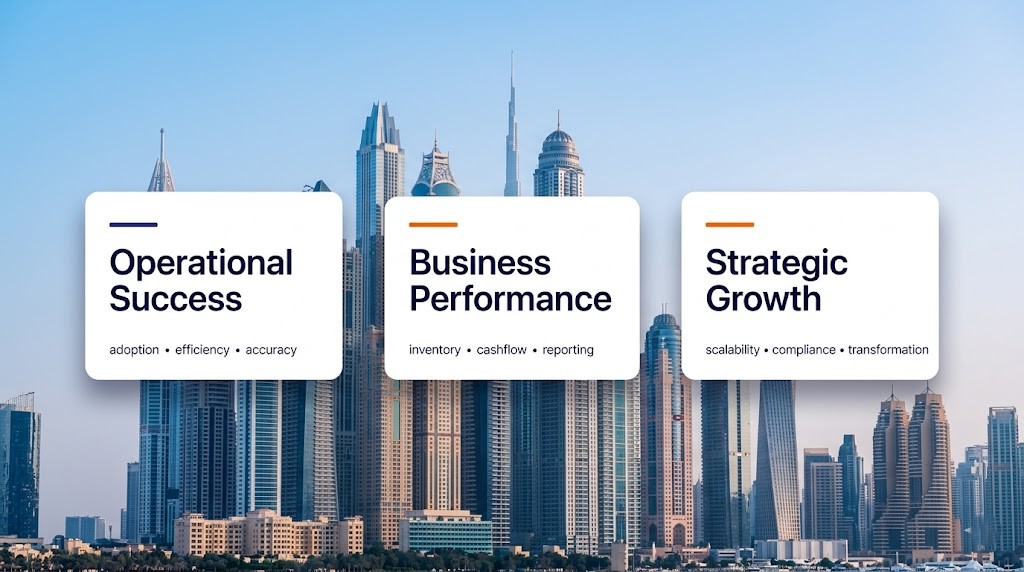
Success criteria for SME implementations:
Operational success:
- Staff adoption rate exceeds 85% within three months
- Manual workarounds and shadow systems eliminated
- Data accuracy and trust in system-generated reports
- Process efficiency improvements measurable within first quarter
Business success:
- Improved inventory visibility and turnover
- Faster financial close (typically 30-50% reduction in time)
- Better cash flow management and working capital optimisation
- Enhanced customer service through real-time information access
Strategic success:
- Scalability for growth without system limitations
- Foundation for digital transformation initiatives
- Compliance readiness for regulatory requirements
- Competitive advantage through operational excellence

Looking to implement or optimize this in Dubai or the UAE?
Speak with WMS Middle East certified SAP consultants for a customized architectural and cost assessment.
The Five-Phase Implementation Framework
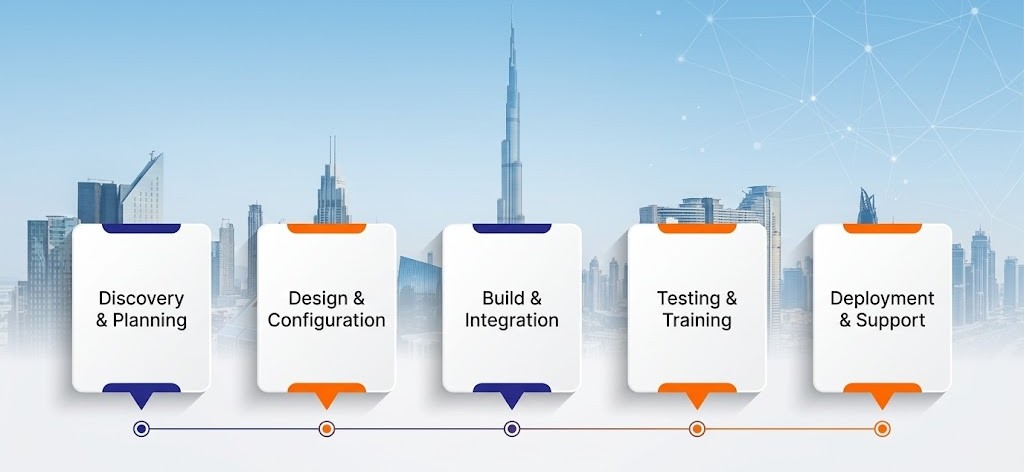
| Phase | Focus | Critical Activities | Success Indicator |
|---|---|---|---|
| Phase 1: Discovery & Planning | Understand current state and define future state | Business process documentation, requirements gathering, project governance setup | Clear, written requirements document signed off by stakeholders |
| Phase 2: Design & Configuration | Blueprint the solution and configure system | Solution architecture design, system configuration, customisation specifications | Approved design document with stakeholder consensus |
| Phase 3: Build & Integration | Develop and integrate the solution | System configuration, custom development, integration with existing systems, data migration preparation | Working system in development environment passing all configuration tests |
| Phase 4: Testing & Training | Validate solution and prepare users | User acceptance testing, comprehensive training, process documentation, go-live preparation | Users confident and competent, all critical scenarios tested successfully |
| Phase 5: Deployment & Support | Go live and stabilise operations | Phased go-live, hypercare support, issue resolution, continuous optimisation | Stable operations with issues resolved within defined SLAs |
Phase 1: Discovery and Planning Building Your Foundation
The discovery phase determines whether your implementation succeeds or struggles. This is where you invest time to save months of rework later.
Critical activities in discovery:
Current state assessment: Document how your business operates today not how you wish it operated or how you think it operates, but the actual reality. This means:
- Following purchase orders from creation through payment
- Tracking sales orders from quotation through collection
- Mapping inventory movements from receiving through shipping
- Understanding approval workflows and decision-making processes
- Identifying system integrations and data dependencies
Pain point identification: What’s broken in your current operation? Be specific. “We need better reporting” is too vague. “Finance spends 12 hours every month-end manually consolidating sales data from three different systems” is actionable.
Requirements definition: Translate business needs into system requirements. Example:
- Business need: “We can’t see inventory across our five warehouses in real time”
- System requirement: “Multi-warehouse inventory management with real-time visibility and inter-warehouse transfer capabilities”
Stakeholder alignment: Secure executive sponsorship and define the steering committee. Implementation without top-management commitment inevitably fails. Your CEO or Managing Director must be visibly engaged not just signing cheques but attending key meetings and championing change.
Project governance structure: Establish clear roles and decision-making authority. Who approves requirements changes? Who resolves priority conflicts? Ambiguity here causes delays later.
Regional considerations for Middle East SMEs:
For UAE companies, ensure your requirements address free zone operations if applicable, multi-emirate operations and e-invoicing integration requirements.
For Saudi businesses, ZATCA Phase 2 compliance must be core to requirements. Don’t treat it as an afterthought integrate compliance into your foundation. Understanding ZATCA requirements early prevents costly rework.
For Egyptian operations, account for multi-currency complexities, import documentation requirements and local tax compliance.
Phase 2: Design and Configuration Architecting Your Solution
The design phase transforms requirements into a concrete blueprint for how SAP Business One will work in your organisation.
Solution architecture decisions:
Module selection: SAP Business One offers comprehensive functionality, but implement what you need now:
- Financial Management (always required)
- Sales and Customer Management
- Purchasing and Inventory Management
- Production and MRP (for manufacturers)
- Service Management
- Reporting and Analytics
Start with core modules. Add advanced capabilities later as you mature.
Customisation vs configuration: A critical decision: Where do you configure standard functionality vs develop custom features?
Guiding principle: Configure first, customise only when business requirements truly demand it. Every customisation adds complexity, increases cost and complicates future upgrades.
Integration planning: What existing systems must connect to SAP Business One?
- E-commerce platforms
- Point of sale systems
- Warehouse management systems
- Customer portals
- Banking systems
Design integrations during this phase. Discovering integration needs during testing creates expensive surprises.
Data migration strategy: How much historical data moves to the new system? Master data (customers, suppliers, items) must migrate. Transaction history requires careful evaluation:
- Opening balances and current open transactions (always)
- Full transaction history (evaluate based on size, age and value)
- Supporting documents (consider cost vs benefit)
Phase 3: Build and Integration Bringing Your Design to Life
The build phase is where your blueprint becomes functioning software configured for your business.
System configuration best practices:
Start with clean foundation: Resist the urge to over-configure initially. Establish core functionality first, validate it works and then add complexity incrementally.
Master data quality: Your system is only as good as the data inside it. Before migration:
- Cleanse customer and supplier databases
- Standardise item codes and descriptions
- Validate pricing and terms
- Remove duplicates and obsolete records
Poor data quality causes more post-implementation headaches than any other factor.
User permissions and security: Design role-based access thoughtfully. Staff should access everything they need and nothing they don’t. Consider:
- Segregation of duties for financial controls
- Department-specific access restrictions
- Manager approval requirements
- Sensitive data protection
Testing in build phase: Test continually during configuration. Don’t wait until formal testing phase to discover issues. When you configure purchasing, test purchasing workflows immediately.
Regional integration requirements:
For UAE operations, integrate e-invoicing compliance during build, not as an afterthought. The technical integration with e-invoice platforms must be tested thoroughly.
For Saudi businesses operating under ZATCA requirements, integration with approved Fatoora platforms is mandatory. Build this into your core configuration.
Phase 4: Testing and Training Preparing for Success
The testing phase validates that your configured system meets requirements and prepares your team to use it effectively.
Comprehensive testing approach:
Unit testing: Test individual functions in isolation. Can you create a customer? Process a purchase order? Generate an invoice? Basic building blocks must work perfectly.
Integration testing: Test connected processes end-to-end. Create sales order → pick inventory → generate delivery note → create invoice → record payment. Follow transactions through complete workflows.
User acceptance testing: Actual end-users test real business scenarios. Finance processes month-end close. Warehouse receives a problematic shipment. Sales handles a customer complaint. Real workflows, real data and real users.
Performance testing: Validate system handles your transaction volumes. If you process 500 invoices daily, test with 750 invoices to ensure capacity.
Training programme structure:
Role-based training: Don’t train everyone on everything. Train users on functions relevant to their roles:
- Finance team: Financial management, reporting, month-end procedures
- Sales team: Customer management, quotations, sales orders
- Warehouse team: Inventory management, goods receipt, picking and packing
- Purchasing team: Supplier management, purchase orders, goods receipt
Hands-on practice: Lectures don’t work. Users need hands-on practice in a training environment with realistic scenarios. Let them make mistakes in training, not in production.
Documentation and job aids: Create quick-reference guides for common tasks. Step-by-step screenshots for procedures staff perform infrequently. Searchable knowledge base for troubleshooting.
Phase 5: Deployment and Support Going Live Successfully
Go-live is where preparation meets reality. Execute thoughtfully to minimise disruption.
Go-live strategies:
Big bang approach: Switch completely from old system to new system on a specific date. Higher risk but faster completion. Suitable for smaller organisations with simpler processes.
Phased approach: Implement by module, location or business unit. Lower risk through gradual rollout. Better for complex organisations or multi-location operations.
Parallel running: Operate old and new systems simultaneously temporarily. Lowest risk but highest resource consumption. Usually not practical for SMEs due to resource constraints.
Go-live timing considerations:
Avoid peak business periods. Don’t go live during:
- Month-end or year-end financial close
- Busy selling seasons
- Major promotional campaigns
- When key staff are unavailable
Hypercare support: The first four weeks post-go-live are critical. Provide intensive support:
- On-site presence initially (if possible)
- Extended helpdesk hours
- Rapid response to issues
- Daily check-ins with key users
- Quick fixes for operational blockers
Issue escalation process: Define clear severity levels and response commitments:
Critical issues: System down or major business process blocked immediate response required High priority: Significant impact on operations response within 4 hours Medium priority: Workaround available response within 24 hours Low priority: Minor issues or enhancement requests response within 48 hours
Critical Success Factors for Middle East SMEs
Based on implementation experience across hundreds of regional SMEs, these factors consistently separate successful implementations from struggling ones.

Executive sponsorship and visible commitment:
Your CEO or Managing Director must champion the implementation actively. This means:
- Attending key project meetings personally
- Making decisions when trade-offs arise
- Communicating importance to the organisation
- Holding teams accountable for adoption
Dedicated project resources: Assigning people to “help with implementation when they have time” guarantees failure. Designate core team members with allocated time. Typically:
- Project manager: 80-100% dedicated
- Key functional leads: 50-70% dedicated
- Subject matter experts: 30-50% dedicated
Realistic expectations: ERP implementation is transformational change, not software installation. It takes longer than hoped, requires more effort than expected and disrupts operations more than planned. Success requires accepting this reality and planning accordingly.
Change management focus: Technology implementation is easy. Changing how people work is hard. Invest in communication, training and change management. Address resistance directly and early.
Partner selection wisdom: Choose implementation partners based on:
- Regional experience (Middle East market understanding)
- Industry expertise (your sector specifically)
- Team continuity (same people through project)
- Post-implementation support (long-term relationship)
At WMS Middle East, we specialise in SAP Business One implementations for growing SMEs across UAE, Saudi Arabia and Egypt. Our approach balances methodical planning with pragmatic execution while incorporating regional compliance requirements from day one.
Data discipline: Commit to data quality from go-live forward. Establish data entry standards, validation rules and governance processes. Poor data discipline negates system benefits.
Common Implementation Pitfalls and How to Avoid Them
Learning from others’ mistakes is cheaper than making your own.
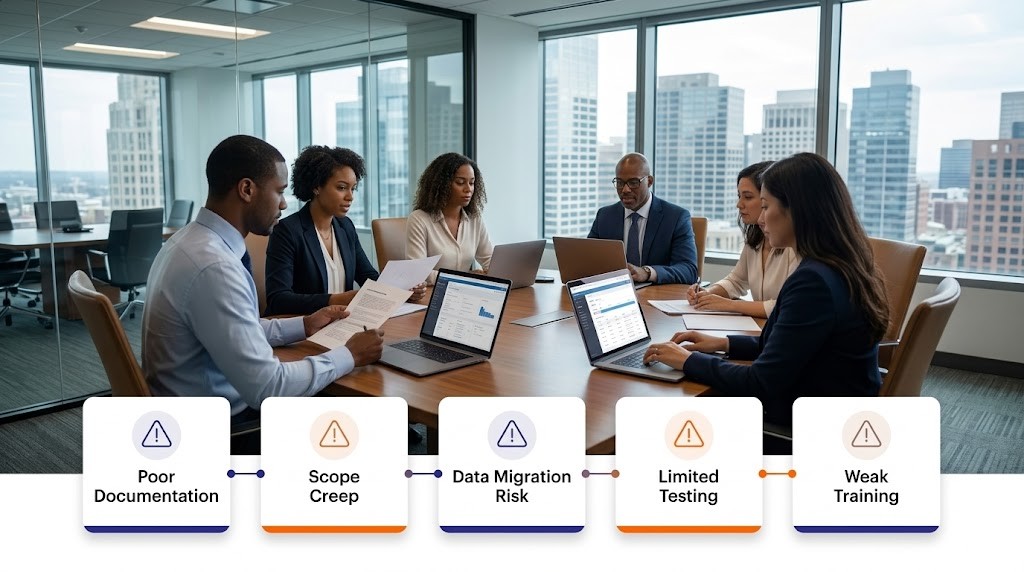
Pitfall 1: Inadequate process documentation
The problem: Starting implementation without understanding current processes. “We’ll figure it out as we configure the system” leads to missed requirements and expensive rework.
The solution: Invest two to three weeks documenting current-state processes before any configuration begins. Written process maps with clear inputs, outputs and decision points.
Pitfall 2: Scope creep without governance
The problem: Requirements keep expanding during implementation. “While we’re at it, let’s also…” adds months to timeline and thousands to budget.
The solution: Formal change control process. New requirements go through approval including impact assessment on timeline and budget. Many “nice to have” features can wait for phase two.
Pitfall 3: Neglecting data migration until late
The problem: Leaving data migration for the last month before go-live. Discovering data quality issues too late to fix properly.
The solution: Start data cleansing early. Perform trial migrations and validate quality iteratively throughout the project. Allocate adequate time for data preparation.
Pitfall 4: Insufficient testing coverage
The problem: Testing only “happy path” scenarios. Real business involves exceptions, errors and edge cases that weren’t tested.
The solution: Test failure scenarios deliberately. What happens when inventory is negative? How do you handle a customer dispute? Document procedures for exceptions and train staff accordingly.
Pitfall 5: Underestimating training needs
The problem: One-day training for all staff, then wondering why adoption is poor. People don’t learn complex systems in single training sessions.
The solution: Multiple training sessions: overview training early, detailed hands-on training close to go-live and refresher training post-go-live. Provide job aids and ongoing learning opportunities.
How to Know You're Ready to Begin
Many SMEs ask: “When is the right time to implement SAP Business One?”
Signs your organisation is ready:
Business signs:
- Growth outpacing current system capabilities
- Manual processes consuming excessive staff time
- Lack of real-time visibility hampering decisions
- Customer service suffering from information gaps
- Regulatory compliance requirements increasing
Organisational signs:
- Leadership committed to transformation
- Budget allocated and approved
- Key staff available to dedicate time
- Willingness to change existing processes
- Realistic expectations about effort required
Timing considerations:
- Not in the middle of major business changes (acquisitions, relocations)
- Adequate cash flow to invest without straining operations
- Ability to weather temporary productivity dip during transition
- No major personnel changes anticipated (CFO departure, for example)
Getting Started: Your Next Steps

If you’ve read this far, you’re likely serious about implementing SAP Business One the right way. The first step is conducting an internal assessment, which usually takes one to two weeks. During this stage, businesses should identify key operational pain points, define priorities, secure an executive sponsor, estimate a realistic budget and timeline, and evaluate internal resources that will support the implementation.
The next step involves education and requirements gathering, typically over two to three weeks. Companies should explore SAP Business One capabilities, review case studies from similar businesses, speak with peers who have implemented ERP systems, and begin documenting high-level requirements while distinguishing between essential features and optional improvements.
After that comes partner evaluation and selection, which generally takes three to four weeks. Businesses should request proposals from qualified implementation partners, review their regional and industry experience, check references from past projects, and ensure their working approach aligns with the organization’s culture and communication style.
Once a partner is selected, organizations move into detailed planning, which may take four to six weeks. This phase includes documenting business processes, defining project scope and deliverables, establishing realistic timelines, setting a project budget with contingency, and identifying clear success metrics and KPIs.
Finally, the implementation must be executed with discipline. By following the structured five-phase framework Discovery, Design, Build, Testing, and Deployment and maintaining strong governance, change control, and quality management, businesses can significantly increase the chances of a successful SAP Business One implementation.
Moving Forward with Confidence

SAP Business One implementation represents a significant investment of time, resources and organisational energy. However, when executed properly with realistic planning, disciplined execution and adequate support, it transforms how growing SMEs operate.
The difference between successful implementations and struggling ones rarely comes down to software capabilities. SAP Business One provides robust, proven functionality. Success depends on how thoughtfully you plan, how effectively you manage change and how thoroughly you prepare your organisation for transformation.
Your implementation journey begins with honest assessment:
Are you treating this as a technology project or business transformation? Do you have executive commitment beyond budget approval? Can you dedicate key resources to the project? Are you willing to change processes rather than just automate existing workflows? Will you invest in change management and training?
If you’ve answered yes to these questions, you’re positioned for implementation success.
Ready to explore how SAP Business One could work for your organisation?
At WMS Middle East, we’ve guided hundreds of SMEs across UAE, Saudi Arabia and Egypt through successful implementations. Our approach balances methodical planning with practical execution while incorporating regional requirements from day one.
We’re here to help you navigate this journey, whether you’re just beginning to explore options or ready to start planning your implementation.
Talk to our SAP Business One specialists to discuss your specific situation, challenges and objectives. We’ll provide honest guidance on timing, readiness and approach helping you make informed decisions that serve your business’s long-term interests. For the full picture on how WMS maximises SAP value beyond go-live, read our guide on maximizing SAP ROI from 100+ successful implementations
To solve operational bottlenecks, discover how SAP Business One inventory management provides real-time warehouse control.
Contact us: No hard sales. No pressure. Just experienced guidance from people who understand both SAP Business One and Middle East business realities. Ready to start your SAP Business One implementation journey? Talk to WMS Middle East we specialise in SAP Business One for UAE, Saudi Arabia and Egypt SMEs, with regional compliance built in from day one
Frequently Asked Questions (FAQs)
How do I know if SAP Business One is right for my SME vs other ERP systems?
SAP Business One is designed specifically for SMEs with 10-250 employees and up to AED 500 million in revenue. It provides enterprise-grade functionality without enterprise complexity and cost. Key indicators it’s the right fit include: you’ve outgrown QuickBooks or basic accounting software, you need integrated operations beyond just finance, you operate in manufacturing, distribution or retail sectors and you require multi-currency or multi-location capabilities. Compare SAP Business One with SAP S/4HANA to understand which solution aligns with your growth trajectory and operational complexity.
What's the biggest mistake SMEs make during ERP implementation?
The most common mistake is treating implementation as a technology project rather than a business transformation project. SMEs that succeed view ERP as an opportunity to improve processes, not just automate existing workflows. This means being willing to change how you work rather than forcing the system to match every current process. The second biggest mistake is inadequate change management—focusing on technical configuration while neglecting to prepare people for the changes ahead. Successful implementations invest equally in technology and people readiness. Read our guide on what to look for beyond technical skills when choosing a SAP partner for the 5 human factors that determine whether implementations succeed.
How do we handle operations during the implementation period?
Business continuity requires careful planning. Your current systems remain operational throughout implementation—you don’t switch until the new system is ready. However, expect some disruption: key staff allocate time to the project (typically 20-50% depending on role), there’s temporary productivity dip during training and go-live transition and some processes may require temporary workarounds. Mitigate disruption by implementing during slower business periods, ensuring adequate staff coverage and planning for temporary additional support if needed. Most SMEs experience 2-3 weeks of adjustment before operations normalise at higher efficiency levels.
What happens if we discover issues after going live?
Post-go-live issues are normal and expected. This is precisely why the hypercare support phase exists. Most issues fall into categories: user error due to incomplete training (addressed through additional training), configuration gaps discovered in real-world use (addressed through system adjustments) and data quality problems from migration (addressed through data correction). Critical is having immediate support available for rapid resolution. Establish clear escalation procedures and response time commitments with your implementation partner. Most issues resolve within the first month as users gain confidence and processes stabilise.
How do we ensure our staff actually adopt the new system and don't revert to old methods?
Adoption requires deliberate management. Successful strategies include: removing access to old systems on a specific date (no shadow systems allowed), tying performance metrics to correct system usage, celebrating early adopters and success stories, providing easily accessible support for questions, measuring adoption rates and addressing resistance directly and ensuring leadership visibly uses the system themselves. The key is making the new system easier than old methods by eliminating workarounds, automating manual tasks and providing immediate value through better information access. When staff see tangible benefits to their daily work, adoption follows naturally.
What role do we play vs what the implementation partner handles?
Clear role definition prevents confusion. Your organisation provides: business knowledge and process expertise, requirements definition and validation, key staff for configuration input and testing, decision-making authority when trade-offs arise, change management and internal communication, end-user training participation and post-go-live process ownership. Implementation partners provide: technical SAP Business One expertise, configuration and development work, project management methodology, industry best practices and recommendations, integration technical work, testing frameworks and validation and post-go-live technical support. Success requires true partnership where each party fulfils their responsibilities. Neither can succeed without the other’s active engagement.
How do we prepare for regulatory compliance requirements like UAE e-invoicing or ZATCA in Saudi Arabia?
Regulatory compliance should be built into implementation from the beginning rather than addressed as an afterthought. During requirements phase, explicitly define compliance needs for your markets—whether UAE e-invoicing, Saudi ZATCA Phase 2 or Egyptian tax requirements. Ensure your implementation partner has demonstrated experience with regional compliance integration. Design phase must include compliance architecture and system configuration should incorporate compliance controls from the start. Testing phase must specifically validate compliance scenarios and go-live must not happen until compliance testing is complete. The investment in proper compliance integration during implementation is far less than retrofitting compliance after go-live.
What should we do to prepare our data before implementation begins?
Data preparation is one of the highest-impact activities you can undertake. Begin data cleansing as soon as you decide to implement—don’t wait for implementation to start. Focus on: customer and supplier master data (remove duplicates, standardise names, validate contact information, clean up inactive records), item master data (standardise item codes, verify pricing, remove obsolete items, consolidate similar items), financial data (reconcile accounts, resolve outstanding issues, document opening balances) and inventory data (conduct physical counts, resolve discrepancies, verify valuations). Clean data means faster implementation, fewer post-go-live issues and immediate trust in system outputs. Many organisations underestimate this work—allocate adequate time and resources.

Mahitab Maher
SAP professional specializing in SAP products, helping companies turn complex processes into smooth, scalable operations.


Nice breakdown. Implementation always feels complex, but this makes it clearer.
Thanks Kevin. We tried to make it as straightforward as possible.
Useful guide for companies planning their first ERP system.
Thanks Michael. Starting with the right approach makes a big difference.
The step-by-step approach makes this much easier to understand for beginners.
Appreciate that Daniel. That’s exactly what we aimed for.
This is helpful for small businesses trying to understand SAP Business One. The steps are explained clearly.
Thanks Ahmed. We tried to keep it simple so it’s easier for growing businesses to follow.
Clear and simple breakdown. Makes it easier to compare different cloud options.
Thanks Hannah. That’s exactly what we aimed for.
Helpful guide. Makes the whole implementation process feel less confusing.
Thanks Daniel. Glad it made things a bit clearer.
Nice guide. Useful starting point for businesses moving to ERP.
Thanks Kevin. Starting with the right approach makes things smoother.
Good breakdown of the topic. Makes it easier to compare options.
Thanks Hannah. Glad it helped with clarity.
Helpful explanation. The difference between private and public cloud is still confusing for many.
Thanks Michael. It’s a common question, so we tried to keep it simple.
The step-by-step format is really helpful, especially for smaller teams.
Thanks Daniel. Glad the structure worked well for you.
ERP implementation can feel confusing at first. This guide makes it easier to follow.
Thanks Ahmed. That’s exactly what we wanted to do.
ERP projects can feel overwhelming for SMEs. This explains the process in a simple way.
Thanks Ahmed. We wanted to make it easier for growing businesses to understand the journey.
Good article for businesses that are considering their first ERP system. The step-by-step approach is helpful.
Thanks Daniel. Glad you found the step-by-step format useful.
Clear and practical article. Good to see content focused on SMEs in the Middle East.
Thanks Rachel. We wanted to make it relevant for businesses in the region.
Nice breakdown of the implementation stages. Useful for companies planning ahead.
Thanks Michael. Planning properly at the start makes a big difference later on.
Many SMEs delay ERP because it feels complicated. This article explains it in a simple way.
Thanks Ahmed. That’s exactly why we created it—to make the process clearer for growing businesses.
Helpful guide for smaller businesses looking into ERP. The step-by-step format makes it easier to follow.
Thanks Daniel. Glad the format made it easier to understand.
Very practical guide. Good starting point for businesses moving to ERP.
Thanks Kevin. Starting with the right approach makes a big difference.
ERP implementation can feel overwhelming, but this guide simplifies it well.
Thanks Omar. That’s exactly what we aimed to do.
Clear and easy to follow. Especially helpful for SMEs in the region.
Thanks Laura. We wanted to keep it practical and relevant.
Good breakdown of the steps. Useful for teams planning their ERP journey.
Thanks Michael. Planning ahead really helps avoid issues later.
Nice guide. It makes the implementation process feel less complicated for smaller businesses.
Thanks Daniel. Glad it helped make things a bit clearer.
We have been comparing different ERP options and SAP Business One keeps coming up. This gives a good overview of what is involved before making the decision.
Thanks Faisal! That’s exactly what we wanted to cover. Choosing the ERP is only the first step; understanding the implementation effort and business requirements is equally important.
Good explanation. One thing I would like to know is how long a typical SAP Business One implementation takes for a small or medium-sized company.
Thanks Omar. The timeline depends on the business size, number of users, integrations, and level of customization. For an SME with fairly standard requirements, the process can be planned much more quickly than a heavily customized implementation.
The part about preparing the business before starting the implementation is something many companies probably overlook.
Absolutely, Sara. A lot of implementation issues actually start before the technical work begins. Getting the processes, users, data, and requirements clear upfront can save a lot of time later.
We are currently looking at SAP Business One for our company in Dubai. The implementation steps mentioned here make the process much easier to understand
Thanks Ahmed! Glad you found it useful. The implementation process can definitely feel complicated at first, especially when it comes to data migration and customization. Planning those areas properly makes a big difference.
This answered most of my questions. Do you have implementation examples from the Middle East?
Thanks Daniel. Many organizations across UAE, Saudi Arabia, and Qatar have successfully implemented SAP Business One to streamline operations.
We are planning ERP implementation next year. What is the biggest mistake companies make?
One common mistake is not involving end users during the planning and testing phases.
We are planning ERP implementation next year. What is the biggest mistake companies make?
One common mistake is not involving end users during the planning and testing phases.
Nice article. Does SAP Business One integrate with eCommerce platforms?
Yes, SAP Business One can integrate with Shopify, WooCommerce, Magento, and other eCommerce systems.
What is the average SAP Business One cost in the UAE?
Pricing varies based on users, modules, and deployment type. A consultation is usually the best way to get accurate estimates.
The migration section was helpful. Did anyone migrate from Excel-based processes directly to SAP Business One?
Yes, many SMEs move directly from spreadsheets. Proper data cleansing before migration is usually the key to success.
We are based in Dubai and evaluating SAP B1. Is it suitable for companies with multiple branches?
Absolutely. SAP Business One supports multi-branch operations, centralized reporting, and inventory management across locations.
Thanks Ahmed. For most mid-sized manufacturers, implementation usually takes 3–6 months depending on customization and data migration requirements.
Thanks Ahmed. For most mid-sized manufacturers, implementation usually takes 3–6 months depending on customization and data migration requirements.